




When translating a file from InDesign into Apple’s iBooks Author, keep these tips in mind for a smoother transition.
Change the page size in InDesign
- Either manually or by using Liquid Layouts, change the page size of your InDesign layout.
- The page size of a horizontal iBooks Author layout is 1024 × 748 (vertical is 768 × 1004).
- Make any adjustments to page elements so you have fewer adjustments to make inside iBooks Author.
- This is often an exercise in deciding which application will allow you to make changes quicker and more efficiently.
Make use of InDesign’s sections
- Each InDesign section becomes a separate section or chapter in the iBooks Author file.

InDesign pages with sections assigned.

The same book split into iBooks Author chapters.
- While you can always add pages to a section or chapter in iBooks Author, moving items from one section to another is tedious and not very intuitive.
Be aware of font usage
- Some fonts won’t make the trip from InDesign to iBooks Author, especially if you’re using a lot of Typekit fonts.
- Test out fonts before you’re in full production mode.
Making the transition
- Save the InDesign file as an IDML file.
- Create a new iBooks Author project using the blank template. Be sure to choose a layout with the same orientation as your InDesign file.
- Choose the option to import all styles and media, discarding unused styles.
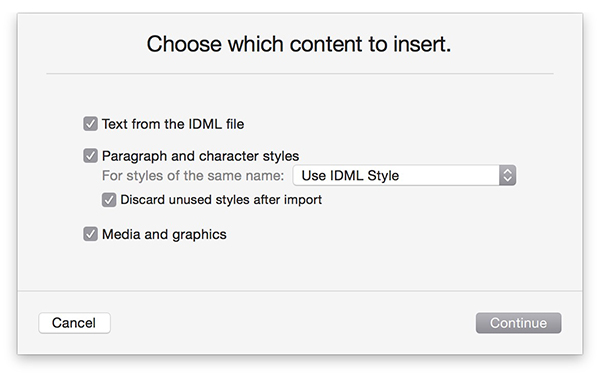
The import dialog box from iBooks Author.
- Remove any existing chapter or section and delete the placeholder items—such as chapter markers and linked text frames—from the master page.
Update the styles in the iBooks Author file
- Redefine paragraph and character styles, if necessary. You may need to apply the “none” character style first, then re-apply any needed character style to get the right formatting.

Styled type in InDesign.

The same type, after importing into iBooks Author.
- Choosing a character style in iBooks Author shows as an override to the chosen paragraph style.

Styled text in iBooks Author.
Other cleanup items
- Master page items from InDesign become regular page items in iBooks Author.
- Image frames (strokes) become separate items.

Image frame with stroke in InDesign.

The same image in iBooks Author. Note the separate frame element.
- Some fonts that come into iBooks Author won’t translate into the final book output (.ibooks) file.
See also: Is Apple’s eBook Tool Right for Graphic Designers?
This article was last modified on October 13, 2015
This article was first published on October 13, 2015
Commenting is easier and faster when you're logged in!

Recommended for you
Secrets of the InDesign Links Panel
InDesign’s Links panel is a wonderful tool for viewing info about placed g...
InDesign Tips and Tricks: Working Efficiently with Values
Anyone who uses InDesign for more than two minutes a day knows that there are a...

InDesign GREP You Already Have
There are a few things in InDesign that send the most seasoned of designers scre...