



This tip was sent to Tip of the Week email subscribers on November 27, 2015.

Sign up now and every week you’ll get a new InDesign Tip of the Week and Keyboard Shortcut of the Week, along with roundups of new articles at InDesignSecrets, plus exclusive deals sent right to your Inbox!
Just scroll all the way down to the bottom of this page, enter your email address, and click Go! We’ll take care of the rest. Now, on with the tip!
Last week’s tip showed how to use keyboard shortcuts to create a quick grid of identical items. This week, let’s see how to adjust the spacing between objects with a simple shortcut to invoke InDesign’s Live Distribute mode.
Start by selecting the objects with the Selection tool.
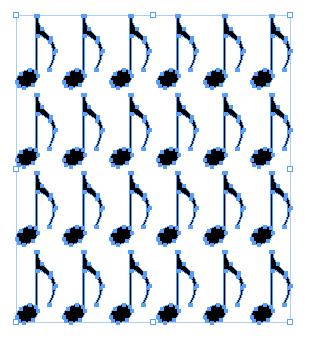
Then click and hold on a side or corner handle. Start dragging. At first you’ll resize the objects.
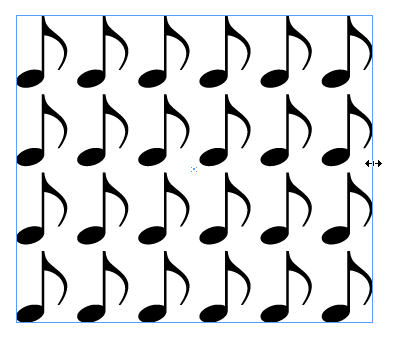
But if you press and hold the spacebar as you continue to drag, the objects snap back to their original size and the space between the objects changes.

Just be sure to release the mouse button before you release the spacebar to complete the Live Distribute magic.
This article was last modified on July 25, 2019
This article was first published on December 1, 2015
Commenting is easier and faster when you're logged in!

Recommended for you

CreativePro Tip of the Week: Viewing Illustrator Artwork as Outlines
This CreativePro tip for viewing Illustrator artwork as outlines was sent to Tip...

Tip of the Week: Printing from the Pages Panel
This tip was sent to Tip of the Week email subscribers on July 9, 2015. Sign up...
Tip of the Week: Tabs Panel Tips
This tip was sent to Tip of the Week email subscribers on February 5, 2015....