



This tip was sent to Tip of the Week email subscribers on December 18, 2014.

Sign up now and every week you’ll get a new InDesign Tip of the Week and Keyboard Shortcut of the Week, along with roundups of new articles at InDesignSecrets and CreativePro, plus exclusive deals sent right to your Inbox!
Just scroll all the way down to the bottom of this page, enter your email address, and click Go! We’ll take care of the rest. Now, on with the tip!
The ability to base styles on one another is one of the most powerful and important features in InDesign. However, there are times when you’ll want to use one style as the starting point for another, without making the new style based on the existing style. That way, the attributes of new style won’t change no matter how you change the existing style.
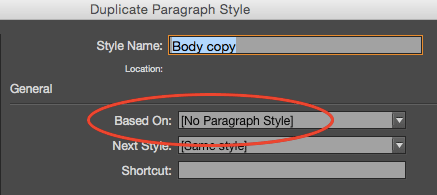
To do this, use the Duplicate Style feature: right-click on a style in the panel and choose Duplicate Style (or click on a style and choose Duplicate Style from the panel menu).
Your new style will start off with all the formatting of the existing style, but it will not be based on that style. Instead, it will be based on No Paragraph Style or whatever style the existing style was based on.
This article was last modified on July 25, 2019
This article was first published on December 23, 2014
Commenting is easier and faster when you're logged in!

Recommended for you

How to synchronize a book with renamed styles
Synchronizing your styles across an excellent is a great way to keep your book c...

InDesign How-to Video: How to Fix Broken Text Styles
In this week’s InDesignSecrets video, Chad Chelius explains why some InDesign st...

Tip of the Week: Changing Object Shapes
How to quickly and easily change object shapes between circles, rectangles, poly...