



This InDesign tip on how to use Quick Apply to run scripts was sent to Tip of the Week email subscribers on September 15, 2016.

Sign up now and every week you’ll get a new tip, keyboard shortcut, and roundups of new articles, plus exclusive deals sent right to your Inbox!
Just scroll down to the bottom of this page, enter your email address, and click Go! We’ll take care of the rest. Now, on with the tip!
If you’re a fan of using scripts in InDesign (and you should be!), you might find your Scripts panel is getting a little crowded as you collect more and more cool scripts. Having to slow down and scroll through a long list of scripts is pretty annoying when the whole idea is to speed things up.
To avoid this problem, one thing you can do is use Quick Apply to run scripts. Just launch Quick Apply by pressing Command+Return (Mac) or Ctrl+Enter (Windows), and then click on the triangle to show the options. Make sure Include Scripts is selected.
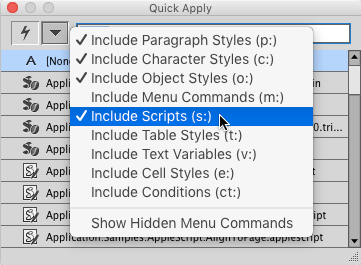
Now you can close the Scripts panel if you like. To run a script, just launch Quick Apply and start typing the script name. When the script you want is highlighted, press Return or Enter and the script will run.
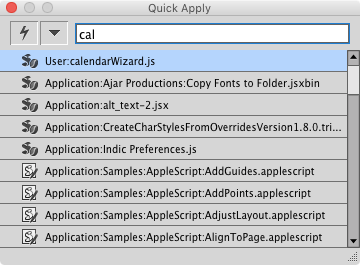
If you find that menu commands or styles are showing up first in the list and making it hard to quickly select a script, then preface the script name with s followed by a colon. This tells Quick Apply to ignore anything that is not a script.

This article was last modified on July 20, 2021
This article was first published on September 20, 2016
Commenting is easier and faster when you're logged in!

Recommended for you

How to Optimize Your Editorial Workflow
Article presented by It’s amazing how sometimes something so small...

How to Install Scripts in InDesign
We all love the power of using scripts, but before you can use them, you have to...
Tip of the Week: Deleting All Images from a Document
There are three new Links panel icons in InDesign CC that you'll see when workin...