




What was the first Bézier drawing program for Macintosh computers? No, it wasn’t Illustrator. Nor was it FreeHand. The answer is Fontographer, created by Altsys (now part of Macromedia) in 1985. That’s two years before Adobe Illustrator and three years before FreeHand, and Fontographer likely played a role in inspiring at least the latter.
As its name implies, Fontographer was conceived as a font-creation program, and it is still sold for that purpose. As more than a few of us have discovered, however, the $349 (list price) program can be a handy addition to one’s software collection, particularly if you often find yourself needing to embed logos or icons within text.
Fontographer, the Pioneer!
Fontographer has a key place in the early history of Macintosh graphics software. As Pete Mason, one of the Fontographer developers, remembers it, the original idea for Altsys was to build a bunch of utilities for the Mac that would customize various resources, and as its first product Altsys shipped Fontastic, which allowed users to edit bitmapped fonts. Then Apple shipped its first LaserWriter printer. “Suddenly Mac users learned there was more to typography than a bunch of crappy bitmaps,” Mason said.
“Our customers started asking about making cool, high-quality fonts that would work with those neato new printers. Thus Fontographer was a pretty natural follow-up product. Since the LaserWriter’s native language was PostScript and the Bézier was the curve model, Fontographer naturally began with Béziers.”
FreeHand’s genesis was partially due to Fontographer customers starting to use the program for drawing more than letters. It didn’t take much genius to figure out that the new laser printers were opening up a market for Bézier drawing tools.
So what use is Fontographer in today’s sophisticated computer graphics environment? Certainly, the average designer doesn’t have time to sit around creating typefaces, especially when one can buy a CD filled with thousands of fonts for a few bucks. In fact, as anyone who has ever started to create an original font can attest, creating a font from scratch can take years. Even the most humble graphic designer can find benefits using Fontographer, however, particular after mastering a few simple techniques.
Custom Dingbat Fonts
Just because a font can contain up to 256 characters doesn’t mean you have to create them all. Imagine you are working on a travel magazine or book that uses special icons to show hotels, restaurants, parking lots, and bars. Your art director has designed special icons that you would like to use along with the text. Instead of drawing a picture box, importing the icon, and then creating an inline graphic, you can use Fontographer to create a custom font that makes using the icons a breeze.

Fontographer makes it easy to insert images such as these four travel icons into text.
Start by creating your vector artwork in any version of Adobe Illustrator up to version 8 or any version of FreeHand. (Sadly, Fontographer doesn’t recognize the new file format of Illustrator 9.) Copy the vector artwork, and then switch over to Fontographer.
In Fontographer create a new font by choosing File > New Font. Then use the Element > Font Info dialog box to name the font.
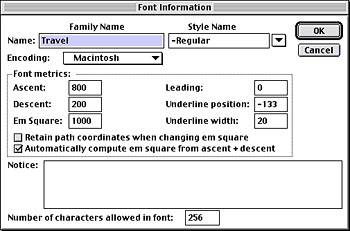
The Font Information box lets you name your new font. Here we to gave a font the family name Travel and then added the weight name Regular, to create the font name Travel-Regular.
After you name your font, a window appears that shows all possible characters of the font.
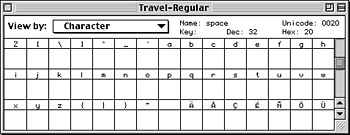
The Fontographer document window shows the possible characters of the new font.
To open a drawing window for a particular character, double-click inside the appropriate box. This reveals the drawing tools you might use to create the artwork for that letter.

The empty drawing window for the lowercase “r” character.
This article was last modified on March 12, 2022
This article was first published on February 14, 2001
Commenting is easier and faster when you're logged in!

Recommended for you

Allow Your Frames to Resize with Your Text
A small but productive feature in InDesign CS6 eliminates overset text
Magazine PIB Ad Revenue Increased 4.4% in November
Total magazine rate-card-reported advertising revenue for the month of November...

The Roots of Efficiency
A thoughtful approach to getting more done in less time without selling your sou...