



Your Life. To Go.
The iBook offers additional expandibility via a host of ports. Just like earlier iBooks, there are no hinged doors to worry about breaking off. One FireWire and two USB ports provide the ability to hook up external devices such as hard drives, scanners, digital cameras, MP3 players, and PDAs. Another new addition is an RGB Video port that allows you to mirror video to a VGA-compatible monitor. Unlike the AV connector, this cable is included. Also present are the standard 10/100 Ethernet port and a 56K modem port. The iBook also offers a Swiss Army-like AV port, which serves as both headphone jack and video out port, for connecting to a television to play movies. Unfortunately, unlike previous Apple laptops, the iBook does not ship with the necessary AV cable needed to do this. You can, however, pick up the $19 cable from the Apple Store.
One other minor disappointment is the lack of support for Apple’s own ADC (Apple Display Connector) port. Given that all Apple displays now depend solely on ADC, it is impossible to hook up your Apple iBook to a contemporary Apple display. This one’s a definite head-scratcher. One can only hope Apple addresses this soon either by adding VGA support back to its displays or ADC support to its line of portables.
Display and Video
While it may not be a new idea, fitting a portable with a 1024-by-768 12.1-inch screen is a commendable touch. This combination helps make a truly small, lightweight portable that offers the desktop space of a larger display. The effect is like working on a 17-inch monitor, providing ample room for all your tools and palettes.
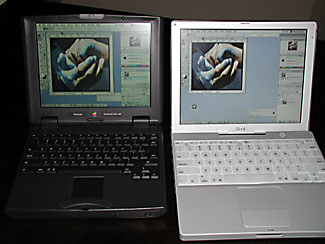
The difference in available screen real estate between the 1024-by-768 iBook and the 800-by-600 PowerBook 2400c is apparent in the amount of visible desktop behind the identical Photoshop workspace.
Apple is also making the claim that the iBook’s display is a perfect match for the bigger text and icons of OS X, which comes preinstalled along with OS 9. Having such a fine pixel density does result in razor-sharp display of text and images. To watching DVD Video playback on this system is to witness true beauty. The iBook sports the ATI Rage Mobility 128 video card with 8MB of video RAM, similar to earlier models. So for those hard-core Mac gamers out there, it might feel a little stunted for your “fragging” needs. But for most everything else the card should prove more than adequate.
The stereo speakers placed above the keyboard sound a bit tinny, as expected. Using headphones should boost both your audio quality and, to a lesser extent, battery performance. The iBook comes with iTunes for both OS 9 and X installed along with an eclectic collection of sampler music and spoken word to get you going.
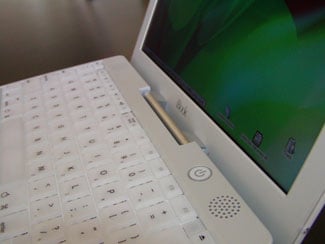
A view across the top: The speakers, power switch, and recessed hinge.
Input
The iBook’s full-size keyboard goes quite well with the rest of its design: The keyboard is snow white, which may challenge the hunt-and-peck typists in the crowd, though the crisp, black key labels provide good contrast. The keys themselves feel OK to the touch: crisp, not spongy, but not quite as inviting as those of my PowerBook G3.
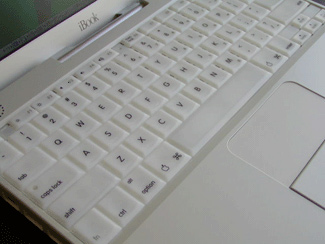
A larger trackpad facilitates thumb-centric mouse navigation without moving your fingers from the keys, but takes some getting used to.
The trackpads across Apple’s notebook line have tended to grow larger in recent years. The intent is probably to give us better control of our pointers, but the larger size makes it easy to inadvertently move the cursor while typing, by brushing against the trackpad with your thumb. Though this approach can be difficult to adapt to, one solution is to begin using your thumb to guide the cursor and hence keep your fingers on the keys. Instead I recommend downloading TapGuard. This great piece of shareware helps alleviate the annoying problem of accidentally moving your insertion point as you type.
Performance
A true portable must have respectable battery longevity. The new iBook boasts a 5-hour run time depending on configuration and usage. Most manufacturers report “best case” battery potential, and the realistic working times you’ll get will vary considerably. I have been able to repeatedly get around 3 hours, 40 minutes of real-world battery life out of this iBook. Of course playing a DVD movie with the speakers on, burning a CD, or keeping your brightness and volume controls turned way up will greatly shorten this time. But turning on some of the advanced conservation options found in the Energy Saver control panel will enable you to squeeze every last waking minute out of the battery’s life. I was able to listen to iTunes for about 7 hours once, but that was with headphones in and the screen off for most of the time. The battery is situated below your right handrest on the bottom of the iBook. It includes a four-level charge indicators and a button to give you a quick read of your battery charge without waking the iBook. The battery is kept in place by a screw latch that can easily be mistaken as just a lock. Be forewarned that the battery has a tendency to pop out after you turn the screw, usually crashing to the floor if you’re not prepared to catch it. Sadly, you can’t swap out batteries without shutting down.
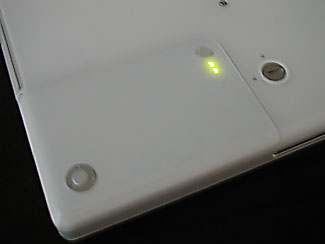
The battery bay, best accessed while the iBook is upside down.
The iBook builds on a 500MHz G3 processor with a 256K backside cache, which provides more-than-adequate power for most users. Although I didn’t do any real performance testing, I did feel a bit more spring in OS X on my iBook with 256MB RAM than with my 400MHz PowerBook G3 with 192MB RAM. One factor that detracts from the iBook’s performance: Apple opted to keep the system bus speed at 66MHz instead of the 100MHz to 133MHz speed of other current Apple systems — even the consumer-oriented iMacs. Don’t get me wrong: The iBook is sufficiently fast for its intended purpose, but it might really scream given a higher system bus speed.
Software
As you’d expect given its consumer focus, the iBook is packed with all sorts of software goodies. Most everything is preinstalled on the system itself as well as included on CD. Mac OS 9.1 and OS X are pre-configured for the iBook and set to boot in 9.1. iMovie 2 and iTunes are also installed for both operating systems along with the aforementioned sampler music and spoken segments. Other software includes AppleWorks 6, Microsoft Internet Explorer, Microsoft Outlook Express, Netscape Communicator, FAXstf, and Palm Desktop Organizer. Buyers also get a few games: Bugdom, Nanosaur, and Cro-Mag Rally.
A Happy Ending
When writing about the new iBook I found myself either trying to stop myself (somewhat unsuccessfully, I fear) from gushing about it or attempting to find some nitpicky faults with the system. Both of these were rather difficult to do. As Apple revolutionized the computing world with iMac, I can’t help but believe it is doing the same in the portable world with the PowerBook G4 and especially this new iBook.
If you’re in the market for an affordable notebook, look no further. The iBook is as easy on the wallet as it is on the eyes. And packing so many features into a 4.9-pound, letter-sized package is truly remarkable. This iBook was well worth the wait.
Editor’s notes:
- Apple has released an updater that should improve the iBook’s audio quality. Find it here
- If you’re installing your own extra RAM, you may need to reset your PRAM to get your iBook to restart correctly. Learn how.
This article was last modified on January 18, 2023
This article was first published on June 27, 2001
Commenting is easier and faster when you're logged in!

Recommended for you

Livestream Video: How to Build Simple Illustrations in Adobe Illustrator
Join Khara Plicanic to learn how to build cool graphics from simple shapes in Ad...

InDesign Efficiency: Keep Your Hand on the Keyboard
Excerpted from the InDesign Secrets video training course on lynda.com. If you...

CreativePro Video: Add a Sky Effect to an Image in Photoshop
See how to quickly replace a sky in Photoshop.