




All in the Family
Through every release of GoLive, Adobe has made an effort to add integration touch points to other products and bring the product’s user interface further in line with the rest. The overarching theme of the Creative Suite is tight integration and a common UI, so it’s not surprising to find GoLive CS having its fair share of features related to this. From the extremely simple manner of bringing over InDesign assets and creating and editing Acrobat files, to the subtle refinements to the user interface, the product has integration written all over it.
Even though InDesign 2 had integration points to GoLive 6, the feature was somewhat hidden and then, once discovered, overwhelming. By taking full advantage of the parallel development effort of the suite, Adobe has been able to address these weak points on both fronts: InDesign and GoLive.
Within InDesign CS, a clearly labeled menu command, “Package for GoLive” is all it takes to assemble your InDesign document and all its assets for use in GoLive CS. Once the package is opened in GoLive, you’re able to preview each page in the Package Assets window (see Figure 7). Hovering your mouse over an asset (artwork or text) will highlight its entire bounding box. Then it’s a matter of just dragging and dropping assets you choose within a GoLive page layout. What’s more, text can be dynamically linked back to the source InDesign document via Smart Object technology or even converted to an image on the fly to retain more elaborate text formatting. Cross-media publishing has never been this easy.
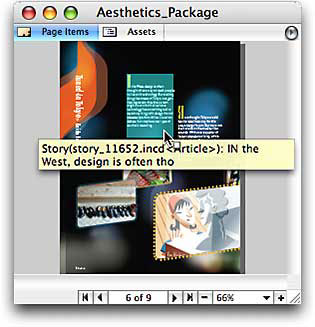 Figure 7: Browsing an InDesign package in GoLive is easy. Then just drag an asset out onto your Web design.
Integration permeates various aspects of this new version of GoLive in many different ways. Of course, GoLive includes support for Version Cue, Adobe’s integrated versioning, and workflow system. Acrobat PDF creation of any Web layout is possible via a simple click of a tab button and there’s even improved viewing and editing links within Acrobat files as well (see Figure 8).
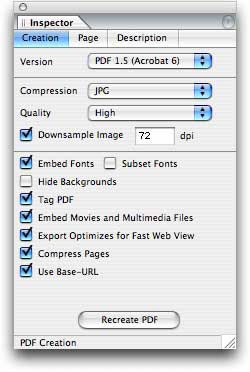 Figure 8: Adobe PDF creation is integrated so tightly that you may not even notice you’re creating a PDF. Just click the PDF Preview tab and GoLive automatically does the rest.
Although there have been obvious attempts to bring GoLive’s interface more in line with the rest of the suite, GoLive still suffers from being the odd one out. Palettes still can be stashed to the side of the screen as they now can within InDesign, yet the palette’s tabs and collapsing widgets are different from all the other applications in the suite. With the attention towards a cohesive user interface through the suite, GoLive’s slight differences stand out all the more. All in all, the user interface is clean and accessible. Any newcomers to the application who are familiar to page-layout applications should appreciate its strong integration capabilities and similar approach to Web layout despite its minor UI inconsistencies with the rest the suite.
Left Behind
Even though GoLive CS is Adobe’s most solid offering of the product to date, it does have a fair share of flaws, issues, and disappointments. For one, if you relied on the Dynamic Content module offered in the previous version for visually laying out dynamic content, you may want to hold off on upgrading for a while. Adobe decided to not develop a version of this module for GoLive CS. Instead, Adobe intends to point you to third-party solutions to fill this void, although, that doesn’t sound like a free solution to the problem. You can still hand code in the server-side language of your choice (PHP, JSP, ASP, etc.). You just won’t have the helpful visually oriented tools to aide you as before.
When working with any type of layout application, easy selection of elements is paramount to getting your job done. Unfortunately, GoLive still suffers from an awkward method of selecting essential elements of your layout such as table elements (TRs, TDs) and layers (DIVs). Although GoLive’s selection behaviors are similar to Dreamweaver’s, they are very out-of-step with the rest of the suite. Where Adobe has engineered innovative features and tools to help selection feel natural and consistent in Illustrator, InDesign, and Photoshop, GoLive goes against all this leaving you frustrated and wondering why it is still different from the rest.
The last disappointment I experienced is in terms of performance. I found GoLive CS to behave sluggishly at times with even with moderately sized site and relatively simple layouts. I suspect this could have something to do with the new Opera rendering engine employed in the Mac version. These shortcomings are not enough to offset the comprehensive set of features and enhancements offered in GoLive CS. If you’re a current user of the Dynamic Content module, you may disagree. However, aside from the clumsy method of handling element selections and the lack of responsiveness, I find this upgrade is still a worthwhile upgrade if you can deal with the minor annoyances.
InConclusion
Whether you’re a longtime user of GoLive, Dreamweaver, or a newcomer to Web design, GoLive CS certainly has something to offer to you. Existing GoLive users will enjoy a refined user interface (albeit slightly different from the rest of the suite), improved features such as Smart Objects, and better code handling through code completion and CSS dynamic previewing.
Visual designers who have latched on to Dreamweaver may want to consider switching to GoLive, especially if you find yourself mostly using Adobe products in your workday. You may find the menu setup and layout-driven design scheme more inviting and logical than Dreamweaver’s somewhat jumbled set of menus and workspace — not to mention the powerful set of integrated tools and features you gain when using GoLive along with the rest of the Creative Suite.
However, those who are more technically inclined may find GoLive’s workflow awkward and not suited for you. That’s just it, GoLive seems as though it was developed with the visual designer in mind where as Dreamweaver has become more and more a tool for the designer turned developer. This is important to note since many Dreamweaver users will probably be put off by GoLive. Adobe software has always appealed to visual designers and even GoLive, a tool that essentially helps to write out code, demonstrates why.
Lastly, if you are new to Web design and development or now tasked with cross-media publishing, I can’t think of a better tool to help get you up to speed with publishing your designs in no time. With GoLive’s superior hooks into Photoshop and Illustrator along with the incredibly easy Package for GoLive found in InDesign, this Web layout design tool is easy to use and understand yet versatile and powerful enough to work on your most challenging of Web sites.
GoLive CS is a worthwhile upgrade for just about anyone considering the application. It still offers some of the most innovative, timesaving features found in a Web design tool and its strong integration points to the rest of the suite, can’t be beat. If you’re using Dreamweaver and still feel uncomfortable with using it, give GoLive a spin. Otherwise if Dreamweaver feels like an old friend, there’s probably not much for you here. Although Dreamweaver is the most popular tool for Web design, I’m hoping (as I expect Adobe is as well) many Adobe Creative Suite Premium Edition owners try GoLive CS and hopefully discover its merits. If this turns out to be the case, Adobe might turn the tides, just as they seem to have with QuarkXPress users warming up to InDesign.
This article was last modified on January 18, 2023
This article was first published on December 23, 2003
Commenting is easier and faster when you're logged in!

Recommended for you

How to Search Using Adobe Bridge
Khara Plicanic uses Bridge to search across multiple documents in a smarter way,...

New LinkTek Product Lets Adobe Acrobat Users Automatically Fix Broken Links When Files Are Moved or Renamed
LinkTek Corporation, a leading provider of data migration software, announced to...

How to Design Button States for Accessibility
Learn how to create accessible button states for web design, while keeping them...