




Every now and again, we hear from people who experience missing characters when they print from InDesign. For example, there might be whitespace where there should be apostrophes, trademark symbols, and other “high ASCII” characters.
The problem often comes down to the printer substituting its own built-in fonts for the ones you specified in your document, and having a little trouble with the substitution. To force the printer to use the robust fonts on your computer instead of its own 90-pound weakling versions, make sure that the “Download PPD Fonts” checkbox is selected in the Graphics pane of the Print dialog box.
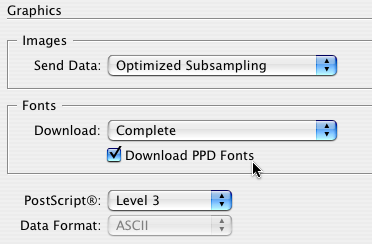
Why did Adobe sneak this font feature into the Graphics pane? Just to keep you on your toes, I guess.
Note that we also talked about the Download PPD Fonts feature back in Episode 77.
This article was last modified on December 19, 2021
This article was first published on July 13, 2008
Commenting is easier and faster when you're logged in!

Recommended for you

A Script to Resize Photoshop Layers to the Canvas
Stop dragging Transform handles and resize Photoshop layers instantly—and precis...

Color Management is Not Color Correction
In the webinar I presented to the Graphic Artists Guild titled Color Manage...
InDesign How-To: Create Typographic Color on a Page
See how to create a more consistent and pleasing look for a page by adjusting ma...