



If you often work with tables in InDesign, you should take advantage of the table stroke proxy in the Control panel. The proxy appears when you have one or more table cells selected, and gives you the ability to quickly target specific cell strokes, and then change the formatting applied to them.

Clicking one of the proxy lines will select or deselect it.
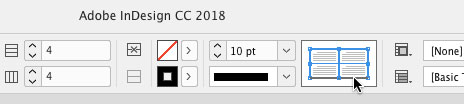
Clicking one of the nodes where proxy lines meet will select or deselect all lines that touch that node.
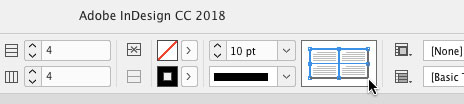
And right-clicking on the proxy gives you a contextual menu where you can target certain strokes even faster and easier. With it, you can instantly select or clear (deselect) the table border, inner strokes, or all strokes.

This article was last modified on April 23, 2021
This article was first published on May 15, 2018
Commenting is easier and faster when you're logged in!

Recommended for you

Tip of the Week: Redefining Styles
Sign up for the InDesign tip of the week to get a new tip, roundups of new artic...
InDesign Tip: Use Quick Apply to Drag and Drop Text
When you’re editing text in InDesign the ability to drag and drop text, i....

How to Set Column and Row Strokes in Table Styles
This is a super simple tip that every InDesign user who creates tables needs to...