



I received an urgent plea for help from a designer in Romania who’d tracked me down through a web forum where I’ve posted answers to a great many InDesign questions. He was on a very tight deadline, and he’d suddenly hit a problem he couldn’t crack.
He had a 90-page book with many examples of XML code that needed to be styled in a particular way. While his GREP Style expression was working for most of his code examples, it wasn’t working for items that spanned multiple lines.
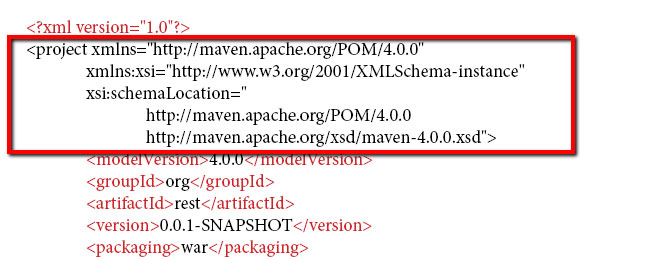
He wanted to know why a multi-line paragraph wouldn’t accept the GREP Style, and (of course) how to fix it. He’d been digging though every GREP resource he could find, but wasn’t finding an answer.
The GREP expression he was using was this: <?(.||\S)*?>. It shouldn’t have been problematic, yet it “wasn’t working.”
The clue is that this is a code snippet. Code snippets come from programmers’ text editors like BBEdit, or Notepad++, which generally don’t care whether a line break is a newline character (a forced line break) or an true end-of-paragraph “hard return.” Copy that text into InDesign, and you’re likely to have hard returns at the end of every line, which become paragraph marks in InDesign.
Sure enough:
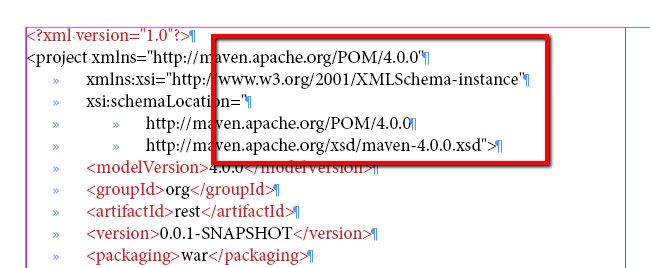
To a programmer, those five lines might seem like “one paragraph,” but as far as InDesign is concerned there are five paragraphs, and none of them contain a match for the GREP expression, which is looking for angle brackets at each end. So, naturally, the GREP Style never shows up.
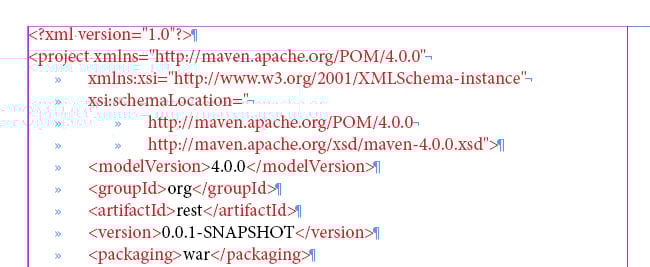
Changing the first four hard returns to forced line breaks turns that section of code into something InDesign sees as a single paragraph. At that point, InDesign’s GREP Style waves its magic wand, and all is as it should be.
The lesson from all this (you knew there’d be a moral somewhere) is, it’s not always the complicated thing that is the problem, which is what we all tend to assume; sometimes it’s something really simple. When something just doesn’t seem to work, it’s often worthwhile to step back, take a deep breath, and see if something else—something you’ve been taking for granted—might be the droid you’re actually looking for.
This article was last modified on July 25, 2019
This article was first published on November 19, 2014
Commenting is easier and faster when you're logged in!

Recommended for you

InDesign Magazine Issue 90: InDesign Nightmares
We’re happy to announce that InDesign Magazine Issue 90 (October, 2016) is now a...
Tip of the Week: Reveal Silhouetted Images with the Document Grid
There are three new Links panel icons in InDesign CC that you'll see when workin...

5 Cool Things You Can Do with GREP Styles
I love GREP Styles in CS4. Here are 10 (or more) tips for how you can use them t...