




Last week at PePCon during the tips session I showed a new script called StyLighter that can create a color-coded preview of where paragraph and character styles have been used in your documents. The script was written by Marc Autret, author of IndexMatic, Show/Hide Local Formatting, Wordalizer, and several other great scripts. StyLighter works with CS4, 5, and 6, and you can download it at Marc’s website, Indiscripts.com.
When you run StyLighter, you get a dialog box where you can select which styles you want highlighted and with which colors.

You then select Activate Preview Mode and click OK. After that, there are no more secrets when it comes to text formatting. Every style and every override is revealed. Red vertical bars indicate paragraph formatting overrides, red strikethoughs indicate character formatting overrides.
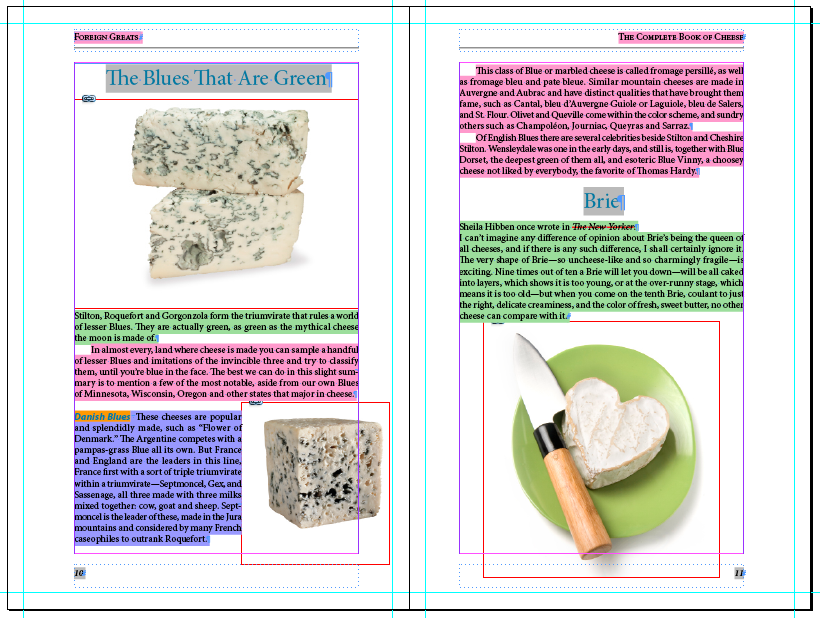
Interestingly, as Marc notes on his website, the script merely enables a preview mode that is built into InDesign. You can’t normally access this mode since the folks at Adobe didn’t put any means of controlling it in InDesign’s user interface. But the StyLighter script reveals the feature, in all its glorious colors. ;)
This article was last modified on December 21, 2021
This article was first published on May 20, 2012
Commenting is easier and faster when you're logged in!

Recommended for you

5 Ways of Removing Overrides Applied to Paragraphs
Did you know that there are several different ways to remove overrides applied t...
InDesign How-to Video: How to Switch Paragraph Styles Automatically
Erica Gamet shows how easy it is to automate a change of styles when you start a...

Automatically Highlight Text with Spaces
InDesign's highlighter style trick is terrific, but here's a couple of ways to m...