


Footnote Spacing (Pre-CC2017)
Adjust the space between main text and single footnotes. InDesign's setting for the space between the text and the first footnote on a page is document-wide, which is too confining....
Oops, you’re not logged in!
Log in or sign up for a free account.


This script is obsolete and largely available for historical purposes. See the full collection of scripts for older InDesign versions here.
Note: From CC2017 the space between notes and the text can be adjusted in each text frame, that is, on each page, so the script is no longer needed from CC2017.
In InDesign the space between the main text and the first footnote on that page is set for the whole document. That’s a problem because you often need to fine-tune that space for certain footnotes. A simple script makes that easy. (Previously I used a script that placed an empty frame with wrap set, but the method described here is easier and more robust.)
Take this fragment:
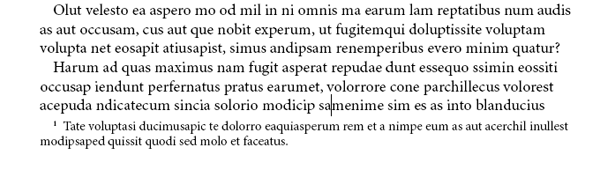
An easy way to add space between the text and the note is to set the keep options of the paragraph just above the note. The idea is to count the number of lines of the paragraph that are in the next text frame, add one, and let that be the number of lines to keep together at the end of the paragraph.
All this is tedious: you need to go to the Keep Options dialog, check Keep Lines Together and enter the number of lines at End. The script does all that for you.
The script has no interface. To use it, place the cursor in the last line of the main text, as in the screenshot, above (the cursor is in samenime). Then start the script. The example in the screenshot will then look as follows:

If after some edits you need to change the number of lines kept together, either run the script again or manually adjust the number of lines kept together.
Peter Kahrel Script Repository
Hosted as a community service, and with deep appreciation, by CreativePro.com
Scripts by Topic | Script Index
Basic Script Installation and Use
How to Modify or Configure These Scripts
Resources for Scripting and Publishing Automation
About This Repository
Contact Peter Kahrel
Note to users: You run scripts at your own risk: CreativePro and the author accept no liability for anything that may be caused by any of these scripts. Always take the necessary precautions. We encourage you to save backups and test scripts on copies of your documents.
This article was last modified on August 22, 2026
This article was first published on February 10, 2026
Commenting is easier and faster when you're logged in!

Recommended for you
Adobe Certified Professional Exam Prep Guides
Use these self-assessment guides to determine what you should study to pass the...

A Script to Round off Size and Position Values in InDesign
Instantly clean up "messy" values by rounding them off to the nearest whole poin...
