



A recent topic on the Lassosoft InDesign mailing list focused on the document information area’s size limit. At one point the slug size limit was brought up and I was pretty sure it was six inches (Fritz discussed all kinds of InDesign limits here) but rather than look stupid I figured I’d fire up InDesign and double check.
I tried to enter 10 inches for the bottom and got the error I expected.

The value had to be between 0 and 6 inches. Excellent, I still have some functioning brain cells.
Just for kicks I tried it with the slug on the side and to my surprise InDesign allowed it…hmmm, 10 inches is okay. How about 24? Yup. 36? Why not? This is just silly…how about 100 inches? Sure, that’s just fine.
Well, I don’t want or need a 100 inch slug and I don’t want it on the side, I want it on the bottom and here’s where it gets interesting…if I lock the slug choices so they all change together, I can create a 10 inch (or 100 inch for that matter) slug all around.

So now what? Traditionally, you’d only find a slug on the bottom of a page and here’s where the trick comes in. Once you have you document set up with the slug on all four sides, use the File > Document Setup command and unlock the slug constraint. You can then change the left, right and top slug amounts to zero while leaving the bottom set to 10 inches.
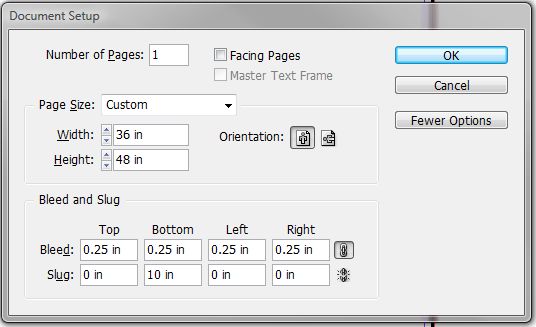
Why would this be useful? Well, for a letter size document, it wouldn’t be, but if you take a look at the screenshots, you’ll see that this document is a 36″ x 48″ poster and having a larger slug size is nice if you want to view the document and slug on screen and see both.
I tried this with CS4 and CS3 and it seems to work. I haven’t tried it on anything earlier.
This article was last modified on December 19, 2021
This article was first published on February 15, 2009
Commenting is easier and faster when you're logged in!

Recommended for you

Applying an Object Style when Placing an Image
This undocumented CS4 feature is so cool. You have to know about it.
Finding and Changing Glyphs
Have you ever tried to switch to a different font in a document which uses speci...
Two Tips in One: Vertical Spreads and Shared Layouts
Robbi wrote, I was wondering if there is a way to have a group of objects in one...