



Most of my work is creating and editing long documents. Each project has 20-50 separate chapters (.indd files), all of which are organized into a book file (.indb). Each book totals several hundred pages, with hundreds of graphics and cross-references. Each document in the book may be cross referenced twenty times to other documents in the book. And InDesign, trying to be helpful, likes to make sure that all these connections are A-OK before letting me edit the document.
So if I open a document with cross-references to ten other documents in the book, guess what happens? InDesign must first open and check each of those ten documents. Now I’ll admit that I need a faster computer, but regardless, this process takes awhile. So I spend a lot of time waiting. And I hate waiting?

To compound the problem, each document is set up as a single text flow. So if content gets added on page 3, everything following will get pushed down to make room for the new content. To this InDesign responds, “But wait! The page numbers may have changed! The cross references need to be updated! Let me check everything again!” And so I wait some more?
Today I remembered a trick I wrote about a couple of years ago: Making InDesign Absolute Links behave like Relative Links. It allows me to duplicate a project (all 50+ books) and still keep the internal link structure intact. It basically involves intentionally breaking all the links to the parent folder by changing the folder name.
So I got to thinking, “If I can break the links to the parent folder, surely I can temporarily break the links all the other documents.” If InDesign can’t find links the first time it checks, it shrugs its shoulders and lets me continue working in peace.
So I took one of my chapters and placed it in its own folder:
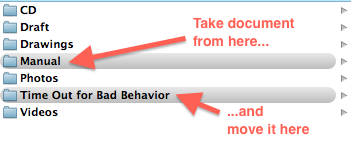
Then, to make sure that the document can’t find all the other documents in the book (and waste my time trying to relink everything), I change the name of the parent folder. Like so:
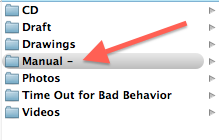
Now, I open up the document I moved to the Time Out folder. After clicking through a series of warnings…

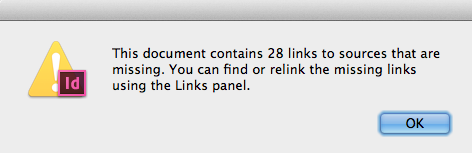

?I can now edit my document without InDesign checking all the links and cross-references every time I click inside of a text frame! Once I’m done editing, I simply correct the name of the original parent folder, and move the document back to reside alongside all its siblings.
Sweet, sweet productivity!
This article was last modified on December 21, 2023
This article was first published on January 27, 2013
Commenting is easier and faster when you're logged in!

Recommended for you

Converting Cross References to Text and Retaining the Information
Cross references were introduced to InDesign in 2008 in version CS4. A cross ref...

How to Mirror a Layout
Flipping a whole layout from a left to a right hand page doesn't have to be a pa...
Locking an InDesign Book File
Matthew asked: …the chapters in our InDesign book file were rearranged accidenta...