




Feeling busy? Overwhelmed? Deluged by work? I know how you feel. My advice: panic. That’s what’s always served me best. But you can’t just drop everything and panic. No, in order to properly initiate Panic Mode, you need a panic button to push. And not any crummy clip art or default library button. Not when you can make a gorgeous, juicy, begging-to-be-pushed panic button in InDesign.

The panic button (or any similar gorgeous, juicy, begging-to-be-pushed button) is great for interactive documents and can be made from just a few simple elements. You could do it with just two objects, but I like to work with four in this case, to give me more flexibility in applying effects.
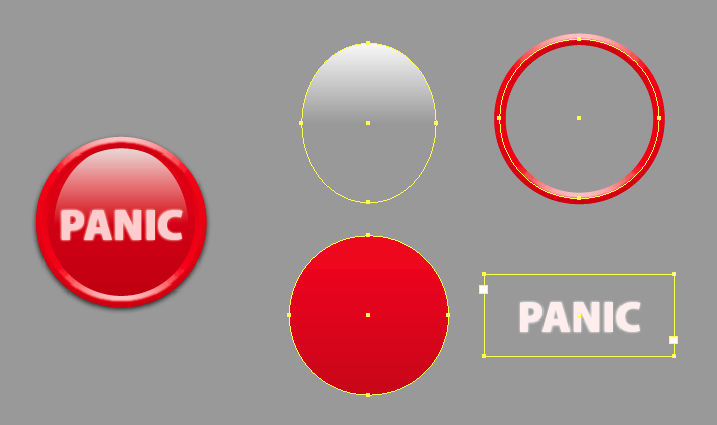
This button is composed of the following ingredients:
- a circle with a beveled stroke and no fill
- a circle with a gradient fill
- an oval with a white fill and gradient feather applied
- a text frame with the name of the button set in a very light tint of the stroke color, and optionally a little Outer Glow just to keep the keep the edges of the letters from being too crisp.
Here are the Effects settings for the stroke:

The settings for the highlight object:

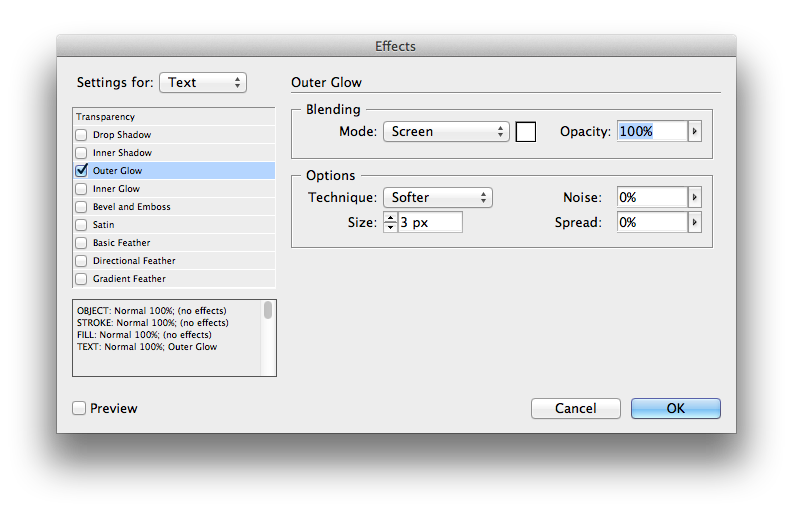
And the settings for text (you could lower the opacity of the glow if it’s too much for you):
If panicking is just not your style, you can always adapt the button to whatever your preferred coping mechanism happens to be.

Just don’t push them all at the same time. That could get messy.
Hope to see you soon at PePCon SF where among other things I’ll be doing FX You Didn’t Know InDesign Could Do.
This article was last modified on December 21, 2021
This article was first published on April 26, 2012
Commenting is easier and faster when you're logged in!

Recommended for you

Document Differencing
If you need to visually compare documents, don't print them out and hold them up...
Wizard of Oz FX: Ruby Slippers
Are you ready to make some ruby slippers like Dorothy's from the Wizard of Oz? J...
Using Quick FX in Affinity Designer
Learn how to stylize objects in Affinity Designer with effects like Bevel/Emboss...