


Tri-Fold Brochure Templates
Includes a pair of tri-fold brochure templates: One for making brochures with a standard 3.5" width folded panels, and another for making brochures from standard US letter-sized paper. Both templates include...

Having the right InDesign template can jumpstart any project and save you a tremendous amount of time and effort over the course of a job. A good template keeps things looking and behaving consistently from page to page and version to version. And it saves you from worrying at output time. You don’t have to test every element because you used them before—you know how a color will print or an interactive button will behave. And you can even reuse parts of a template when a different job comes along, so you’re never starting from scratch.
These are just a few of the reasons why great InDesign templates are so valuable and why we’re making them an exclusive benefit for CreativePro members.
Below, we have a pair of tri-fold brochure templates courtesy of James Wamser of Ripon Printers in Wisconsin.
The first template is for making brochures with a standard 3.5 inch width folded panels. The second template is for making brochures from standard US letter-sized paper.
Both templates include a basic set of paragraph and character styles that you can adapt to your needs.
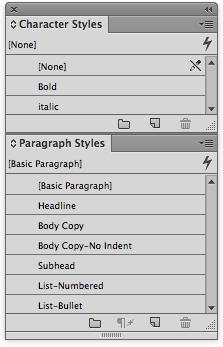
Plus, each includes a non-printing layer with dimensions and notes.


With these templates you can make quick work of a brochure, and focus on being creative (and efficient)!


If you’re currently logged in as a member, the download link appears below.
Commenting is easier and faster when you're logged in!

Recommended for you
Livestream Video: CC Libraries: A Crash Course
Are you using CC Libraries? Tune in to find out why you should be!

Merge Ahead: Choosing the Right Tool for Variable Data Jobs
Which tool will smooth the road for the variable data that drives your customize...
Using 3D in Affinity
Create rotatable 3D objects using Affinity and Canva AI with Steve Caplin.