




Press relase
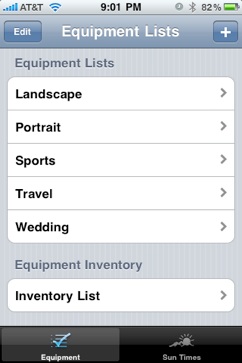
PhotoAssist is a photographer’s assistant for planning. It will help you manage what is needed for your next photography or video shoot. You can create equipment lists for various types of photo shoots including nature, sports, wedding, or travel shoots, ensuring you have everything needed. You can add to the already supplied set of lists to create your own, or delete ones you don’t need. You can also keep an inventory of photo equipment you already have giving you an easily portable database for all your photo and video equipment needs.
This app also features a Sunrise/Sunset calculator to help you find the right times for the perfect lighting. You can either find the times for your current location and date, or pick a date in the future and select from a list of popular US cites to find when the sun will rise or set in that location. This helps you plan ahead for the perfect time to shoot you photographs or video.
Features:
* Track lists of equipment needed by shooting style or type
* Keep an inventory of person equipment you own.
* Assign equipment to different categories.
* Track the sunrise and sunset in major US cities, or in your current location.
What’s in this Version 1.0:
This version lets you manage a database of lists of different shooting types you might undertake. It also features a sunrise/sunset calculator.
System Requirements:
Compatible with iPhone and iPod Touch. Requires iPhone OS 3.0 or later.
This article was last modified on January 5, 2023
This article was first published on November 13, 2009
Commenting is easier and faster when you're logged in!

Recommended for you

Before&After Design Tip: Don’t Trap the Space
Empty space surrounded by text and images can weaken your design.

Sort Files with Adobe Bridge
Adobe Bridge offers a far richer set of file-sorting options than your OS. They...

Ascender Corp. Offers Microsoft Office 2008 for Mac Fonts
Ascender Corporation, a leading provider of advanced font products, today announ...