



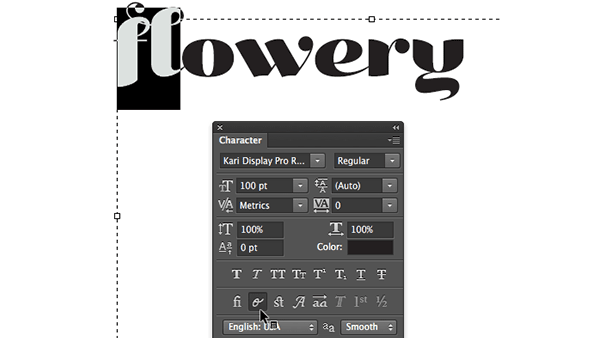
As Ilene Strizver wrote in a recent TypeTalk, you can use alternate characters in OpenType fonts to improve the look, personality, and effectiveness of your type. It’s an awesome tip because alternate characters can improve your type in all kinds of ways. They can offer small changes like slightly longer (or shorter) descenders, or big changes like decorative swashes or characters that fit together via discretionary ligatures.

And OpenType alternates are easy to apply via the Glyphs panel in InDesign and Illustrator…but not Photoshop, which lacks a Glyphs panel.
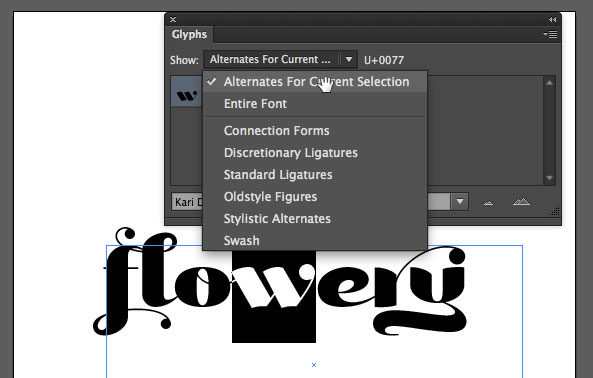
Illustrator’s Glyphs panel
You can apply some (but not all) alternates in Photoshop by opening the Character panel (Window > Character), selecting the glyphs you want to replace, and clicking on the Contextual Alternates button.


But when there are multiple alternates for a glyph, clicking the button will do nothing, since Photoshop has no idea which alternate you want.
So how can you choose and apply specific alternate OpenType characters into your Photoshop type designs? The answer is simple: copy and paste from Illustrator. Just add some type to an Illustrator document using the same font, color, size as you want to use in Photoshop.
Then copy it, and paste it into your Photoshop document.
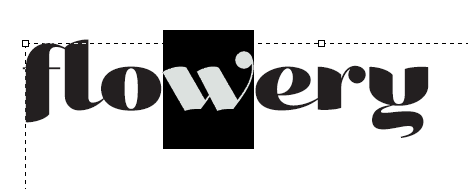

Note that this same trick does not work if you try to copy and paste from InDesign. You have to use Illustrator as the source of the alternate character.
It’s slightly annoying, though simple enough to get you by until the day comes when Photoshop has a Glyphs panel of its own.
This article was last modified on October 8, 2014
This article was first published on October 8, 2014
Commenting is easier and faster when you're logged in!

Recommended for you

How to Turn a Photograph Into a Cartoon in Photoshop
Learn the simple steps for creating a seemingly hand-drawn cartoon from a photo,...

The Path to Beautiful Tables, Part III: Working With Numbers
Don’t miss part 1 and part 2 of this series on how to create beautiful tab...

The CreativePro Guide to Graphics File Formats
Learn about graphics file formats, their pros and cons, and how to choose which...