




This story is taken from “InDesign Magazine,” Issue 6
If you’re in the habit of saving closely related variations of a Photoshop file as multiple files, you may not realize how much more efficient you could be if you instead used Photoshop’s layer comps. Now that InDesign CS 2 fully supports layer comps, ignoring these capabilities is like throwing away money.
The ability to turn layers and layer comps on and off? in placed images makes working with multiple, closely related designs a breeze. During and after design, it can ease the headaches of preflight, asset management, and digital delivery by slashing the number of image files.
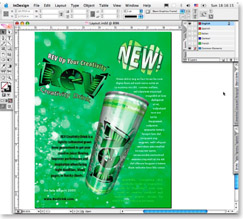
A little layer wizardry makes the layout and graphics of this five-language advertisement a snap to design, manage, and modify.
Follow along as author Pariah Burke makes the most of layer comps to create a multilingual ad for REV Creativity Drink. While the brand is fictitious, the tips you’ll take away are all real.
We’ve posted this excerpt as a PDF file. All you do is click this link “InDesign & Photoshop” to open the PDF file in your Web browser. You can also download the PDF to your machine for later viewing.
To open the PDF, you’ll need a full version of Adobe Acrobat (6 or higher) or the Adobe Reader, which you can download here:
Adobe Acrobat.
To learn how to configure your browser for viewing PDF files, see the Adobe Reader tech support page.
This article was last modified on December 13, 2022
This article was first published on August 23, 2005
Commenting is easier and faster when you're logged in!

Recommended for you

How to Adjust Colors in Photoshop Using Hue and Saturation
Learn how to manipulate an image’s colors using Photoshop’s Hue and Saturation s...

Using Photoshop’s Generative Fill to Remove Objects
Learn how to simply remove items from an image in Photoshop, without extra conte...

How to Adjust Colors Using Photoshop’s Contextual Task Bar
Learn how to use the Photoshop Adjust Colors feature to make quick, non-destruct...