


Photoshop 7: Using Brush Shapes and Textures


Dual Brush
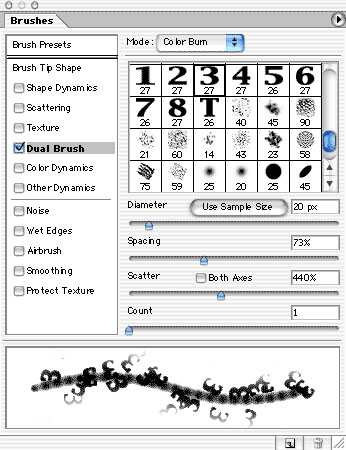
The Dual Brush option adds another brush tip to the tip selected in Brush Presets or Brush Tip Shape. The second tip is overlaid using the blending mode at the top of the Dual Brush pane of the Brushes palette. The Dual Brush pane is a cross between the Brush Tip Shape and Scattering panes. In addition to selecting the second brush tip and blending mode, you adjust the second tip for diameter, spacing, scatter, and count.
You can use Dual Brush to add a texture to a brush (upper example) or to add a custom brush within a shape defined by the initial brush tip (lower example).
This story brought to you by the National Association of Photoshop Professionals (NAPP). Copyright 2002 KW Media Group. Photoshop is a registered trademark of Adobe Systems, Inc.
This article was last modified on January 3, 2023
This article was first published on June 25, 2002
Commenting is easier and faster when you're logged in!

Recommended for you
Illustrator Basics: Using the Magic Wand Tool
Use the Magic Wand tool to select similar objects with just one click!

Batch Process Images with PhotoBulk
If you work on a Mac and regularly have to process images to size, optimize, or...

Secrets of the Esc Key
If you’ll pardon the pun, the Esc key might escape the notice of many Adob...