



Steve wrote: “Can you tell me why some of my index references are in parentheses and some are not? What does that mean?”

Parentheses around page numbers in the Index panel indicates that Suppress Page Range was selected for the “Type” in the Page Reference Options dialog box when the index entry was created.
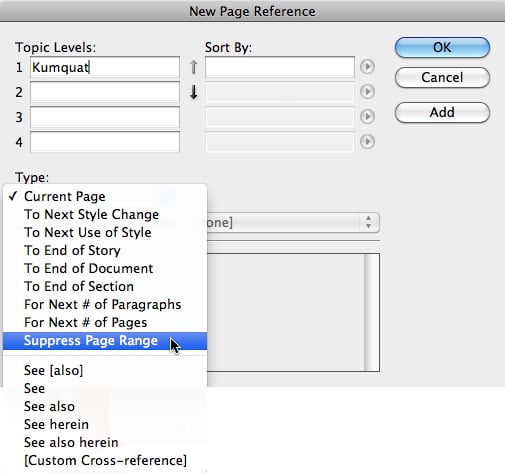
Choosing Suppress Page Range will cause the page number to appear in the Index panel, but the page or page range will not appear in the final generated index.
This article was last modified on December 21, 2021
This article was first published on November 16, 2011
Commenting is easier and faster when you're logged in!

Recommended for you

Beware of local formatting and numbered lists
Using direct formatting with auto-numbered lists can change the appearance of th...
Data Merging – Part 2
Last week I began a series on using InDesign’s powerful Data Merge feature...
Why sRGB and Unsynchronized Color Settings Can Be a Good Thing
Anyone who knows me or the books I've co-authored, such as Real World Photoshop...