




One of the most common complaints I hear from people who grapple with the complexities of color management is that each application has its own user interface, and all too often its own idiosyncratic terminology, for setting up the default profiles for the various devices in the production chain. Wouldn’t it be great if there were one central location where we could specify our monitor profile, our scanner profile, our final separations profile and our proofing printer profile, instead of setting them separately in each application, as we do now?
That’s what’s known as a rhetorical question. Of course everyone would rather be able to set their profiles once, and have all their applications-image editing, vector illustration, page layout, and so on — pick them up automatically. That’s the thinking behind Apple’s new ColorSync 3, which ships with Mac OS 9. The newly revamped ColorSync control panel lets you set profiles for input, display, final output and proofer, as well as setting default document spaces for RGB, CMYK, grayscale and Lab. You can even save different profile sets as workflow configurations that load with a couple of mouse-clicks.
ColorSync 3 also contains hooks that allow applications to pick up all this information from the control panel, or even launch the ColorSync control panel from within the application without having to make the trip to the Apple menu to pick new settings. It offers a global interface, at the operating system level, for making most of the necessary settings that are currently handled differently by each application. This could, in theory, eliminate a whole slew of user interface code in all our leading color-savvy applications, as well as making it much easier to avoid the disasters that occur when we forget to change the a profile in one application so that it matches all the others.
Consistent across Applications
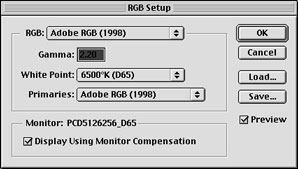 Fig. a
 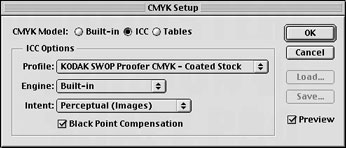 Fig. b
In short, ColorSync 3 is a really good idea that holds out the promise of making our lives much simpler. To illustrate the point, figure 1 shows the color management settings for Adobe Photoshop 5.5 (a and b), Adobe Illustrator 8.1 (c), Adobe InDesign 1.0 (d and e), and QuarkXPress 4.04 (f). Even though three of these applications come from the same vendor, the color management interfaces bear little resemblance to one another. Instead, we have a plethora of confusing options we have to navigate to set the same profiles in the various applications.
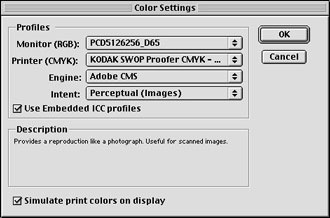 Fig. c
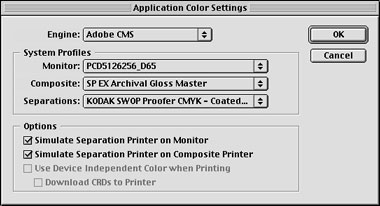 Fig. d
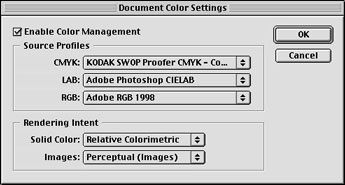 Fig. e
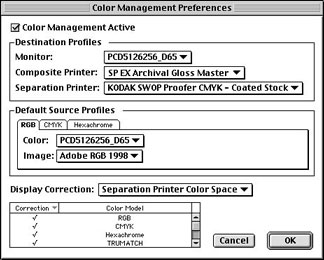 Fig. f
Compare this with figure 2, which shows the ColorSync 3 control panels for device profiles and for document profiles. If you’re at all like me, you’d much rather make your settings once in the control panel, and have your applications automatically pick them up, than wade through a whole slew of utterly dissimilar dialogs in your various key apps.
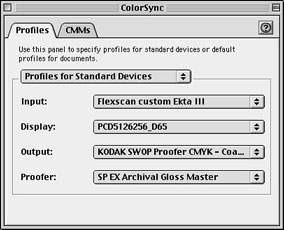 Fig. 2a
 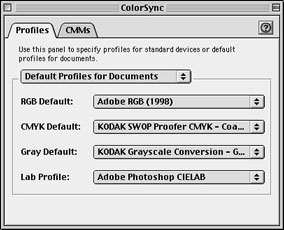 Fig. 2b
Unfortunately, while Apple has done an excellent job of providing a robust set of color management services that applications could use to set their profiles, it probably isn’t going to happen unless a lot of users make a lot of noise, because while Apple gave with one hand, offering ColorSync 3 to Mac users, they took away with the other hand by stopping development of ColorSync for Windows.
Inconsistent across Platforms
Why does this matter? Simply, the applications vendors have shown time and again that they want to make their applications as near to identical across platforms as they possibly can. Indeed, a good many, including Adobe, no longer even produce separate documentation for Mac and Windows. And unless the applications vendors decide to use the services that the new ColorSync offers, Apple’s efforts will come to naught, and users will still be stuck with different user interfaces for color.
To break the logjam, one of three things needs to happen. Apple could reconsider, and deliver ColorSync as a cross-platform solution by shipping a Windows version of ColorSync 3. Or, Microsoft could either license ColorSync or develop its own solution with similar functionality. Or, the applications vendors could decide to sacrifice cross-platform parity in favor of making life easier for those of us who use Macs to do our color work.
Out the Windows
None of these scenarios is likely to occur unless users demand that they do. Under interim-in-perpetuity CEO Steve Jobs, Apple’s message has changed from stressing compatibility with Windows to claiming flat-out superiority, and the decision to abandon ColorSync for Windows was obviously a calculated one designed to push ColorSync as a platform differentiator. While it would undoubtedly make life easier for users in the graphic arts and prepress markets, shipping ColorSync for Windows probably wouldn’t be in Apple’s interest. Microsoft continues to pay lip-service to the idea of implementing pro-quality color management in the operating system, but the limited functionality of ICM 2.0 in Windows 98 and the total absence of any color management features in Windows NT suggest that it’s hardly a front-burner issue for them. And it’s anathema to the applications vendors to do anything that suggests favoring one platform over another.
The only ray of sunshine in all this is that both the operating system vendors and the applications publishers do listen to the demands of their users. If you, the readers, want to clean up the color management mess, you’re going to have to make a fuss. Write to Apple and point out that unless they develop ColorSync for Windows, the big applications will simply ignore ColorSync. Write to Microsoft and point out that the Mac OS has once more advanced far beyond Windows in terms of its color-management capabilities, capabilities that Windows users need too. And deluge Adobe, Quark, Macromedia, Corel et al with email pointing out that proprietary user interfaces and idiosyncratic terminology simply make their applications much harder to use. Demand that they take advantage of ColorSync 3 for their Mac versions, and that they evangelize Microsoft to provide similar functionality in the Windows operating system so that they can continue to make applications that are largely platform-neutral. Otherwise, color management will continue to be the confusing mess it all too often is today.
E-mail addresses:
Apple – Clickhere
Microsoft – fe******@*******ft.com
Quark – cs******@***rk.com
Adobe – Clickhere
Macromedia – cu*************@********ia.com.
Corel – Click here
This article was last modified on March 12, 2022
This article was first published on November 10, 1999
Commenting is easier and faster when you're logged in!

Recommended for you

Free Photoshop and Lightroom Webinar
As part of their ongoing Create Now: Ask A Pro webinar series, Adobe is offering...

The Creative Zone: Taking Your Photography to the Next Level
Excerpted from Canon EOS M: From Snapshots to Great Shots by Jeff Carlson. Copyr...
Photoshop CS6 updated
Adobe has released an update to Photoshop CS6 (version 13.0.1) that fixes a tota...