




Hey folks, it’s time for another InDesign mystery that you can solve for a chance to win an awesome prize!
Here’s the scenario:
You’re given a file with a list of items in two columns, followed by note with an asterisk. The note sits in its own paragraph, in a threaded text frame directly after the list.
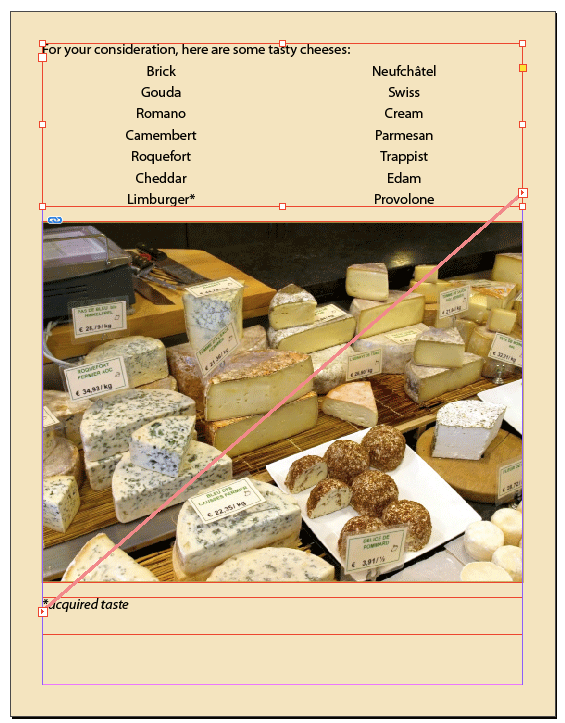
The note is currently aligned to the left, but you’ve been asked to make it align to the right side of the text frame, which extends to the page margins.
You put your cursor in the note paragraph and click the button in the Control panel for right alignment.

The note paragraph moves to the right, but it’s still nowhere near the right side of the text frame.

Also, if you click the button in the Control panel for center alignment, the note text moves but it is not centered in the text frame.

All text frames on the page are single-column frames with no inset spacing.

There are no indents on any paragraphs and nothing is affected by text wrap.
Why is the text aligning in this manner?
This month’s prize is full access for 3 months to the video archives for PePCon 2016 or the CreativePro Conference (up to $495 value!).
The winner will be chosen at random from all the correct answers I receive before June 21, 2017
Enter now by emailing your solution to mike at indesignsecrets.com
Note: Comments are closed on this post so no one gives away the answer. Good luck!
This article was last modified on July 25, 2019
This article was first published on June 14, 2017
Commenting is easier and faster when you're logged in!

Recommended for you
How to Fix Missing Content Problems in Premiere
Learn what the media warnings in Premiere mean and how to address them
How to Be a Better Graphic Designer: Sweat the Details
Nigel French reminds us how much the little things matter in design.
Review: Astute Manager Pro
This new service makes it easy to back up, restore, and sync your Illustrator se...