




Hey folks, it’s time for another InDesign mystery that you can solve for a chance to win an awesome prize!
Here’s the scenario: You’re working on a print project. The client gives you all their production files including InDesign files (set up for print with CMYK colors, bleeds, etc), art files, a PDF preset.
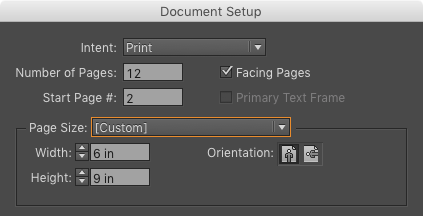
At one point, the client asks for a set of PDFs to check your progress. You output the PDFs using the PDF Preset they gave you. As you’re checking the PDF you notice something: the Page Size has grown! The size in InDesign is 6″ × 9″.
But in Acrobat you see it’s one-third of an inch larger, in both width and height.
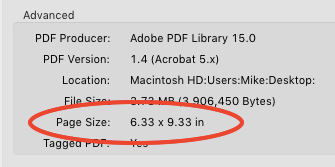
You’re sure you used the client’s PDF Preset. Why is the PDF page size larger than the InDesign page size?
This month’s prize is a license for TextExporter from Rorohiko.
There will be two winners: the first person to respond with the correct answer, and another person chosen at random from all the correct answers I receive before March 14th, 2016
Enter now by emailing your solution to mike at indesignsecrets.com
Note: Comments are closed on this post while the contest is open so no one gives away the answer. Good luck!
This article was last modified on July 25, 2019
This article was first published on March 7, 2016
Commenting is easier and faster when you're logged in!

Recommended for you

How to create guides shorter (or longer) than the page
Did you know you can create guides that are shorter than the width or height of...

Differentiating Devious Doppelgänger Words
A while back, I wrote “Lethal Lookalike Words and How to Spot Them.” In it, I cl...
How to Use Animated GIFs in InDesign
Learn how to spice up your InDesign documents with animated GIFs using Myra Ferg...