




Ever since Adobe has killed off Image-ready, a lot of designers have been trying figure out what program to use. Many are still using Photoshop to mockup sites though it is not the right tool for the job. The correct tool would be Fireworks. Fireworks has many things in common with InDesign; In fact, I like to call it InDesign for the web. It supports Master pages, styles (for text and objects) and even a text wrap-like effect.
Moving your Layout
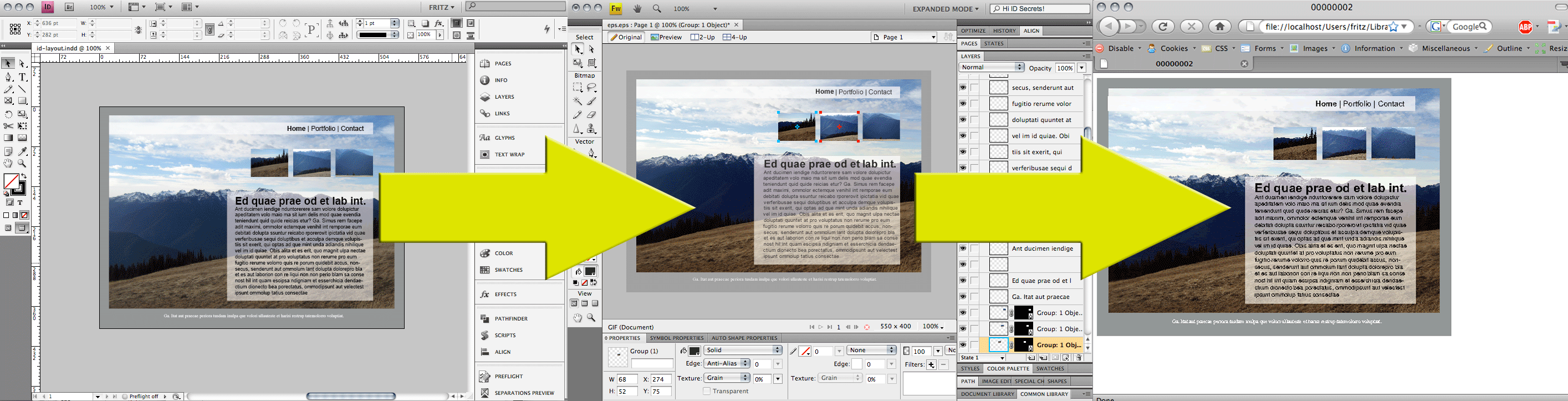
Why would someone want to even bother with sharing information between these two programs?
I have a three letter answer for you: CSS
Yes, InDesign can “technically” export to XHTML & CSS, but your layout will not be anything remotely close to your original layout. It will be up to you to manually code the CSS to re-create your layout.
Fireworks can export HTML and CSS and replicate a close proximity of your layout. Fireworks is only for the prototype of the site, but it will provide a nice handoff to Dreamweaver where you can finish tweaking the code until your layout is complete.
How to transfer your InDesign layout to Fireworks
1. Export your layout as an .eps file.
2. If you are using both ID CS4 and FW CS4 you can open your file directly inside FW.
3. If you are using ID CS3, you may need to open the eps in Illustrator and re-save the file as an .ai.
4. When you open your eps (or .ai) file inside FW you will have to ungroup everything. Just select that layer and go to Modify > ungroup.

5. Now your layout is ready to go.

Limitations
Transparency will not transfer correctly. It will “look” OK, but it will fall apart if you try to move the object around.

Your text will be editable, but it will be broken into individual lines similar to the XFL export to Flash.

I don’t know if Adobe approves this workflow or not, so please be on the lookout for the black helicopters with Adobe logos on them hovering above your workplace.
Conclusions
Overall, I would not recommend this workflow as an ideal solution to create a webpage from an InDesign layout. It is however, a useful technique to use when you need to reuse elements from your InDesign layout inside Fireworks or Dreamweaver. Hopefully, the interoperability between the creative suite apps will continue to improve in CS5 and beyond.
This article was last modified on December 17, 2022
This article was first published on December 15, 2008
Commenting is easier and faster when you're logged in!

Recommended for you
How to Export an SVG from Photoshop
Photoshop can't export SVGs anymore, but don't panic! Khara Plicinic offers two...
Export a PDF to a PowerPoint File from Acrobat
Editing your PDF file will be a breeze if you export it to PowerPoint, with Chad...