



A.L. wrote:
I have a document with many two page spreads. Not savvy enough about InDesign a few months ago, I did the two-page spreads without using the Master Page. Now I need to bring the objects on the spreads closer to the center by about an inch!
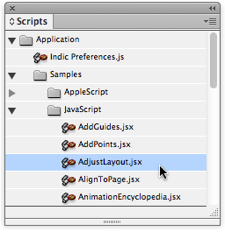
If you had to do this by hand, it would take a long time! Fortunately, there is a much faster way, using a script that you already have! It’s the AdjustLayout.jsx script, which lives in the Application samples folder, inside the Scripts folder:
When you run this script (double-click on it), it opens a dialog box asking how far you want to move the objects on each page:
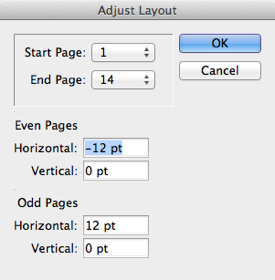
But here’s the tricky part? you know how your spouse always mixes up “left” and “right” when giving directions and it drives you crazy? This script seems to have trouble with “even” and “odd.” Worse, if you specify a Start Page and an End Page, it doesn’t work properly (it applies it to the wrong pages).
Fortunately, I happen to know a few scripters, including the inimitable Olav Martin Kvern. When Ole was at Adobe, he actually wrote most (probably all) of those sample scripts that ship with InDesign. He’s at Silicon Publishing now, but he graciously updated it for us. You can get the newer version here. (Hey, Adobe! Feel free to use this to update your old copy!)
This article was last modified on December 21, 2021
This article was first published on July 19, 2012
Commenting is easier and faster when you're logged in!

Recommended for you

Multi-Level Automatic Numbering in InDesign
Making multiple levels (like 1A, 1B, and so on) in a list seems confusing at fir...
How Can I Align Double Digits in a Numbered List?
Question: What is the secret of getting numbers to align correctly in numb...

How to Create a Checkerboard Paragraph Rule
In a recent InDesign Secrets article, Keith Gilbert explored How to Add a Rule A...