




Some of you may have experienced the LabelGraphics script that ships with InDesign. It’s a very cool script written by Olav Martin Kvern that lets you quickly create captions for all the images in your document. The captions can be based on each file’s name, file path, XMP description, or XMP author. (XMP is the metadata that you can store in images with Bridge or Photoshop.)

But as much as I like the metadata workflow, that’s not where most image captions live. Usually, someone has typed an image caption into an email, or a Word document, or some other place. How to get those captions in the right place? Fortunately, the scripts that come with InDesign are meant to be used as examples — starting points for modifications — and Steve Wareham (who you may recall wrote the great swatch-switcher script) rose to the challenge.
His new script, LabelGraphics_mod.jsx, adds a couple very useful features beyond automatically making a label text frame (and putting that text frame on a new layer named “labels”):
- An option to paste the current clipboard contents into the label frame (yay!)
- Automatically expanding the height of the clipboard to fit the caption
- It will work on one or more selected images, or (if no items are selected) it offers the option to create labels for all the images throughout a document
- You can change the fill color of the text frame it creates
Here’s a look at its new dialog box:
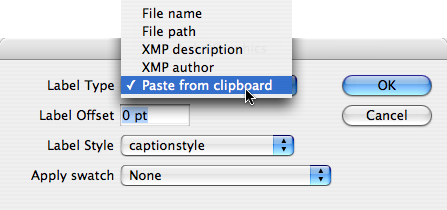
This is a great improvement, and a great hail of thanks goes out to Steve for his work. You can download the script by clicking on this link. We’d love to hear what you think of it!
This article was last modified on December 19, 2021
This article was first published on July 4, 2008
Commenting is easier and faster when you're logged in!

Recommended for you
Create an Automatic List Inside a Paragraph
Create automatic numbered or lettered lists inside an InDesign paragraph with th...
How to Balance Text Columns Automatically and with Baseline Grid
Bring balance to your InDesign spreads with this Text Frame Option.
Interview with Joy Pollard, Designer and Adobe Certified Professional
Learn how roller derby, astronomy, and theater influenced one designer’s journey...