




I wrote an article a while back about how to change the color of a character style back to “ignore” so that the character style would no longer apply a color. It’s not obvious how to do that! Anyway, Susan wrote in a comment there:
What I need is a character style that tints all colors to 70%. Can I set a tint with ?? and ?? for both the fill and stroke?
This is an interesting question! Is it possible to set a character style to change the tint, but not apply a color? At first it doesn’t appear that it is, because the Tint field is grayed out and you cannot type a value in it:

So here’s what you do: Choose a color (any color!) then set the Tint value. And then use the Command/Ctrl-click trick to deselect the swatch from the list of colors.
The Tint swatch goes blank and gray again. Drat you say… but then check out the General pane of the dialog box to see the definition:
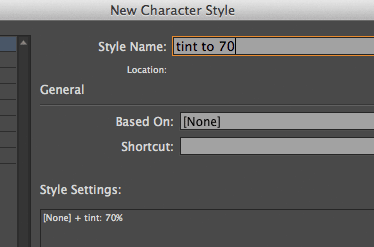
Yes! This is a character style that will tint any color. So it’s an example of how sometimes InDesign’s UI lies to you (it’s blank in the Color pane, but it really applies the tint anyway).
This article was last modified on December 30, 2021
This article was first published on September 19, 2013
Commenting is easier and faster when you're logged in!

Recommended for you

Tip of the Week: Viewing Color-blind Previews of Your Pages
How to view an InDesign layout as it would appear to someone with color blindnes...
Apply Character Style [None] with a Keyboard Shortcut
Many users of InDesign like to assign a custom keyboard shortcut for their oft-a...
Tip of the Week: Easy Fake Duotones
How to create duotone effects applied to images with a simple blend mode techniq...