




Lapses in Memory
But the Kodak plug-in isn’t without its shortcomings and quirks. The scanner can capture 12 bits per channel, but the plug-in only delivers 8 bits to Photoshop. You can choose whether to have the plug-in process the 12-bit data from the scanner, or use only 8 bits for very slightly faster results. We found that the trade-off wasn’t worthwhile, more because the speed difference was so tiny than from any major quality issues with the resulting scans.
A much bigger problem is that the Kodak plug-in leaks memory like a sieve. We found that if we refrained from rotating or sharpening images from the plug-in, we could make a maximum of 10 scans before the plug-in would provide a warning that insufficient RAM remained to continue scanning. Rotating or sharpening images brought the limit down to around 5 or 6 — this on a machine with 1.5 GB of RAM. Needless to say, this puts a crimp in the fast automatic scanning scenario. Kodak has acknowledged the problem and is working on a fix for version 2.0 of the plug-in. They also acknowledge a cosmetic bug where, after exiting the plug-in while connected to a USB scanner, your Photoshop toolbox winds up looking like the one in Figure 6. (Choosing the tool restores the icon, but it’s further evidence of some very sloppy programming on Kodak’s part.)

Figure 6: Kodak remodels Photoshop’s toolbox.
Mining SilverFast
Fortunately, the Kodak plug-in isn’t the only game in town. Kodak has now begun bundling a version of LaserSoft’s SilverFast plug-in with the scanner. SilverFast is an extremely full-featured scanner driver, with full color management support for canned or custom profiles, large prescans, and a complete suite of editing tools that includes selective color correction. It also lets you capture 12-bit data from the scanner for positive and monochrome, but not for color negative scans (see Figure 7).
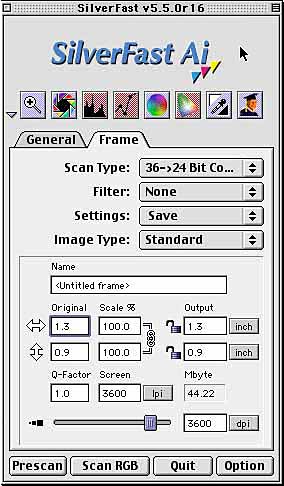
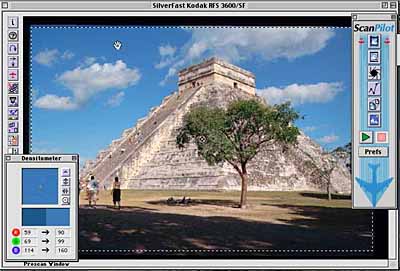
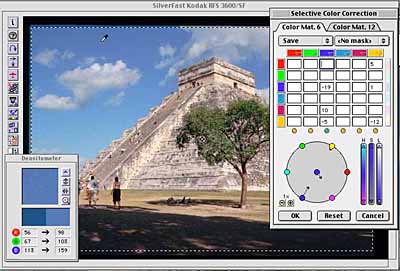
Figure 7: SilverFast Ai is a full-featured scanner driver that offers large previews (top), an on-screen densitometer that shows before-and-after values graphically as well as numerically (middle), and advanced controls such as the Selective Color controls (bottom) shown here.
SilverFast supports batch scanning, but not as quickly or easily as the Kodak plug-in would if it worked as designed. To scan a film strip in SilverFast, you first need to make an overview scan, which records thumbnails of all the frames on the film strip. Then you need to make a prescan for each image — and since the prescans are larger than those made by the Kodak plug-in, they take longer. They do, however, provide you with a much better basis for making edits to the scan.
SilverFast is a complex piece of software. It isn’t hard to use once you’ve learned it, but that learning curve is quite formidable, and ascending the learning curve isn’t made any easier by the distinctly Teutonic flavor of the PDF manuals. It does produce excellent scans on the RFS 3600, as it does on almost every scanner it drives, but it’s not the best fit to the hardware in terms of exploiting the film-feed capabilities.
Did We Mention Free Film?
The one thing that the RFS 3600 has the potential to do better than other scanners in this range is to scan lots of negatives with a minimum of intervention, but until Kodak fixes the serious problems with its software, that capability remains only a potential. We’d be more excited by the RFS 3600 hardware if it included a FireWire interface rather than SCSI — your current computer may have SCSI, but your next one may well not, and if it does, the SCSI bus will likely be dedicated to high-speed hard drives, where you probably don’t want a scanner slowing things down. This is a decent scanner at a reasonable price point, but be very sure that its capabilities fit your needs before parting with your hard-earned cash.
This article was last modified on January 3, 2023
This article was first published on November 20, 2001
Commenting is easier and faster when you're logged in!

Recommended for you

Digital Camera How-To: Shooting Snowy Scenes
Winter is a great time to get out and take some pictures with your digital camer...

Scanning Around with Gene: When Sparks Fly
There is a Dark Side Of course, anything that burns or explodes shouldn’t...

Photoshop Power Shortcuts on Adobe TV
After the conclusion of the Adobe MAX conference in May, I posted a news item ab...