



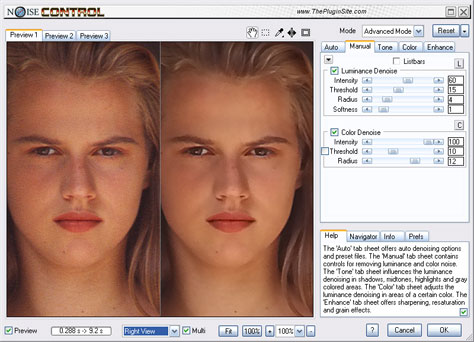
Noise in a photograph isn’t always bad. Occasionally, those colored speckles that are most common in the shadows can add a gritty, grainy mood that enhances the image. But usually, you want to get rid of noise.
When you’re trying to fix photographs with a lot of noise, the ideal is to remove that noise without also removing details that make your images look sharp. Many software programs aim to solve this problem, and now there’s a new one: NoiseControl from The Plugin Site.
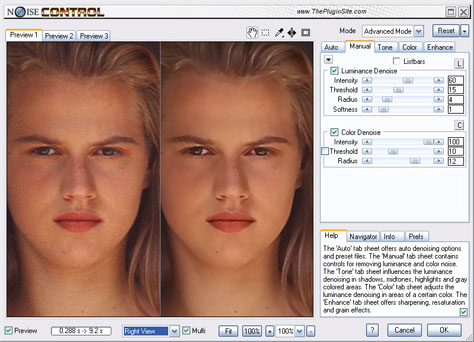
You can automatically remove noise using NoiseControl’s Auto Sample and Auto Preset. Auto Sample finds a part of the photo without any details; Auto Preset chooses an existing preset based on your camera’s model and the photo’s ISO setting. NoiseControl also gives you several ways to manually tweak any photo’s denoising settings. You can affect shadows, midtones, highlights, and nine color areas.
Once you’ve banished the noise, you can stay in the plug-in and fine-tune sharpening and grain. You can also adjust the image’s saturation.
?
NoiseControl is a $50 Photoshop plug-in. At the moment, it’s available only for Windows computers, but The Plugin Site says that a Mac version and an Adobe Lightroom plug-in are in the works.

This article was last modified on December 14, 2022
This article was first published on June 21, 2011
Commenting is easier and faster when you're logged in!

Recommended for you

Create Patterns With Adobe Capture CC
How do you create beauty? There’s the old fashioned way: First, create the...

Develop Your Photography Skills Each Week with The Practicing Photographer
If you want to be great at anything, whether it’s baking bread, shredding...
Photoshop Quick Tip: Applying OpenType Alternates
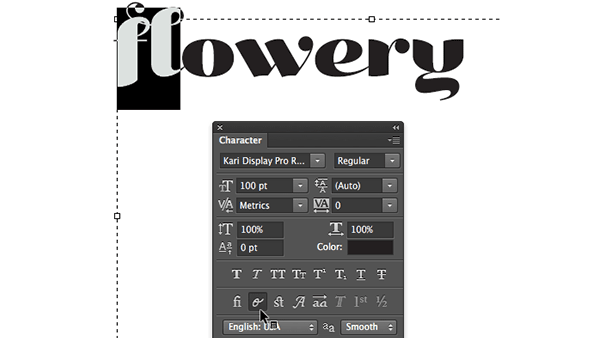
As Ilene Strizver wrote in a recent TypeTalk, you can use alternate characters i...