



You don’t have to be a Macintosh user to be impressed with the design of Apple’s new iPod MP3 player. Like the best of Apple’s designs, the iPod not only looks cool, it also does some things that are so obviously right, it’s hard to figure out why no one thought of them sooner.
For creative professionals, though, the iPod is more than just a tidy way of carrying 1,000 songs in your pocket. Because the iPod sports a FireWire port and a hefty 5-GB hard drive, it’s also a tiny, battery-powered mass storage device, ideal for taking presentations and work on the road. (Reminder: Make sure you explain this feature of the iPod to your boss or your accountant when justifying its expense.)
More Than a Pretty Face
You only need a glimpse of the iPod to appreciate how pretty it is. What’s surprising is how functional the iPod’s design is. The screen is big, bright, and easy-to-read, while the simple controls allow easy one-handed operation.

Before you can listen to songs on your iPod, you have to transfer some audio files from your Mac. iPod offers extraordinarily seamless integration with Apple’s iTunes audio player. iPod requires iTunes 2 (which is included on the iPod unit itself). Once iTunes is installed on your Mac, just connect the iPod using the supplied 6-pin-to-6-pin FireWire cable. iTunes then launches on the Mac automatically (see figure 1).
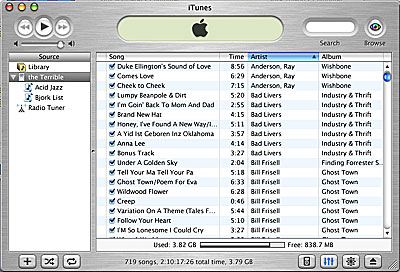
Figure 1: When you plug your iPod into your Mac, iTunes automatically opens. The iPod appears in the left-hand pane. Clicking on it shows its contents as well as its playlists.
In its default configuration, iTunes will sync with your iPod as soon as it launches. All songs and playlists in your current iTunes library are automatically downloaded to the iPod. If you’ve previously synched, then only new songs and playlists get transferred. And if you’re starting from scratch, you’ll first need to rip some CDs or download MP3 files and load those into iTunes. When you hook up your iPod, it will automatically sync, or you can use iTunes 2’s new Update iPod command to force the iPod to sync.

Figure 2: iTunes 2 features a new iPod Preferences button that appears when the iPod is plugged in.
By clicking on the iPod options box within iTunes, you can turn off automatic synching so that, when you plug in the iPod, it will simply appear on your desktop as an additional hard drive. iTunes will still launch automatically, but no music will be transferred to it. Instead, you transfer music by dragging and dropping from the Finder, or from your iTunes library and into the iPod’s icon within iTunes. And because the iPod sits on your desktop as a regular hard drive, you can also drag any type of data onto the iPod, just as you would to any other type of volume.
Transfer time to the iPod is amazingly fast. Transferring an entire 700 MB CD of MP3 files to the iPod takes roughly 1 minute, 45 seconds, while an hour’s worth of MP3s takes only 12-15 seconds.
While there are other MP3 players with gigabytes of storage, the iPod’s FireWire connector makes the iPod’s capacity much more usable and practical than players with slow USB connections. When you can so quickly download a CD’s worth of MP3 files, it becomes much more reasonable to listen to those files on your portable iPod instead of being chained to your computer.
In addition to playing MP3 files at any bit rate, the iPod can also play standard AIFF files and WAV files.
Taking Control
The iPod’s controls are very simple. From it’s main menu, the iPod lets you choose between viewing your songs as a list, or grouped by performer and album. You can also scroll through any installed playlists, or change your iPod’s settings (backlight timer, shuffle, repeat, and so on).
You navigate through these lists by thumbing a wheel located in the middle of the iPod’s control pad. Spin to the right and the current selection moves down, spin to the left and the selection moves up. Clicking the button in the middle selects a tune, while clicking the menu button on the top of the control pad moves you back up the menu hierarchy.
This “scroll pad” is a great interface development. It lets you quickly navigate a huge list of items with a single hand. What’s more, as you spin the wheel, it accelerates, allowing you to quickly work your way through a list of hundreds and hundreds of songs.
Until you use it, it’s difficult to understand how simple and elegant Apple’s iPod interface is. With just a few controls, Apple has created an interface that provides easy access to a huge database of songs.
Tiny Big Drive
Inside the iPod is the same type of super-thin hard drive used by manufacturers of Type I PC Card drives. The iPod also includes a 32MB RAM buffer. When you start playing a song, the iPod reads and caches as much data as it can (roughly 20 minutes) into RAM.
In addition to affording you 20 minutes of skip protection, the iPod’s RAM cache also means that the iPod can spin down the hard drive, greatly increasing its battery life. Apple’s claim of 10 hours of continuous playback seems pretty accurate.
The iPod lacks any kind of power port. Instead it simply charges itself over the FireWire cable when you’re plugged into your Mac (as long as your computer is awake). If you don’t have your Mac handy, you can use the DC adapter — essentially a DC plug with a 6-pin FireWire adapter.
Apple’s hard drive/RAM combo is a clever way to improve both performance and battery life and the scheme works very well. Though there is a slight lag when you first hit play, once the iPod has started caching, playback is smooth and seamless.
What’s Missing
As well designed as the iPod is, there are a number of things we’d like to see added. While iTunes 2 adds a graphic equalizer and the ability to perform cross-fades between songs, neither of these playback options is included in the iPod.
The iPod’s excellent menu system and controls quickly leave you thirsting for more organizational power. We’d really like to be able to build playlists on the iPod — not just on the host computer — as well as to delete songs. This may be possible in the future. The iPod’s firmware is upgradeable and Apple will release a upgrade application which means that new features could easily be added to the iPod.
Finally, for $400, Apple should provide some kind of case for the iPod. Though it’s a shame to cover such a pretty device, it would be worse to see it get scratched or damaged.
Did You Say “$400”?!
So who really needs to carry around 1,000 songs? My iPod currently has 664 songs in it with 1.3 GB of space remaining. According to iTunes this is equivalent to 2 days, 2 hours, 27 minutes and 16 seconds of continuous music. Obviously, this is great for travel, but does anyone really need to carry that much music all the time? Probably not.
But if, in addition to listening to music, you also find yourself regularly carrying around lots of data — to make presentations, deliver content, or commute between a home and office computer — then the iPod’s ability to act as a 5GB FireWire hard drive might prove very useful. Measuring roughly the same size as a deck of cards, the iPod is probably the smallest portable Firewire drive that you’ll find. If you carry an MP3 player with you anyway, having one device that provides integrated storage and music playback might be very handy.
There is one caveat, however (although your boss doesn’t need to know this lest your expense report be scuttled as a result): Although using the iPod as a portable FireWire drive is a great way to move data from one computer to another, the iPod is not intended to serve as a full-time hard drive. The tiny drive inside was designed for performing short reads and writes into and out of its memory buffer. Continuous drive access — like you’d use to run an OS or play video from a hard drive — can quickly burn out the drive.
The iPod also points the way to other types of appliances. Apple has stated that what makes the iPod unique is that the company has complete control over the software, connection, and the playback device itself. This control lets Apple engineer features — such as iTunes’ automatic synching — that other MP3 players can’t provide. When you see this kind of integration, along with fast FireWire performance, it’s not hard to imagine other functionality. It would be great to see Apple add FireWire DV playback to the iPod, turning it into a full-blown multimedia playback machine. (Or perhaps MP3 encoding, as the iPod’s chipset already includes the feature.)
If you’re a Mac user who’s been considering the purchase of an MP3 player, then you should definitely look at the iPod, especially if you also need portable storage. And if you’re a PC user? This may be reason enough to seriously consider that “other” platform.
This article was last modified on January 18, 2023
This article was first published on December 7, 2001
Commenting is easier and faster when you're logged in!

Recommended for you

TypeTalk: Trademark and Register Symbols
Q. Are there any rules for setting register and trademark symbols? What sizes, p...

A Shortcut to View Pages Horizontally
This post was inspired by InDesign Secrets editor Mike Rankin’s comments a...

Setting Defaults in InDesign
One of my favorite things about InDesign is that it often keeps me from doing so...