



Press release
Kubota Image Tools is pleased to announce the newest addition to the Kubota Lightspeed Workflow family – new Kubota RPG SpeedKeys 2.0 for Lightroom 2. Kubota RPG SpeedKeys 2.0 for Lightroom 2 is a customizable wireless USB keypad with preset 1-button access to: essential adjustments such as brightness, exposure, fill light and more; the most popular Kubota Lightroom presets; and advanced tools such as paint with light, burn, soften skin, and hand-color.
In addition, the Kubota RPG SpeedKeys 2.0 now offers 48 new key options for completely customizable functionality. This gives users the ability to create hundreds of settings and preset combinations. The innovative Kubota RPG SpeedKeys software allows photographers to use pre-programmed workflow key combinations or they can use their own presets settings.
Kubota RPG SpeedKeys 2.0 comes loaded with 29 Kubota Lightroom Presets. As a bonus, the SpeedKeys comes with the entire collection of Kubota Lightroom Presets v3, which includes develop, export, print, filter, and more. All of the presets included in Kubota Lightroom Presets v1 and v2 are also included in the set, plus brand new presets never before available. There are over 100 presets in all.
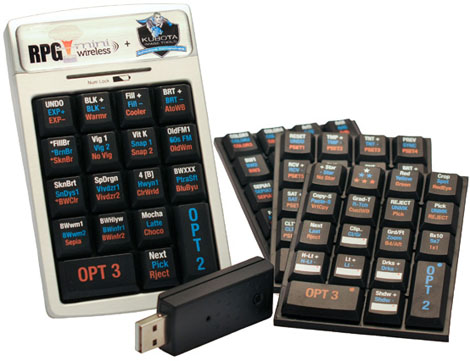
The Kubota RPG SpeedKeys 2.0 for Lightroom is available for purchase at: www.kubotaimagetools.com. Price is $349.00. It is available as a free upgrade to customers who purchased the first version of the Kubota RPG SpeedKeys. Also available is the Kubota RPG SpeedKeys 2.0 with Kubota RAW Workflow for Lightroom 2. This video tutorial helps photographers learn how to efficiently use Adobe Lightroom 2. This combination pack is available now for $399 (a savings of $50 if purchased separately).
This article was last modified on January 18, 2023
This article was first published on October 27, 2009
Commenting is easier and faster when you're logged in!

Recommended for you

Spacefish, the World’s First Flexible Flashgun
The Spacefish is an appropriately weird name for a weird-looking new p...
Snapheal offers high-end photo retouching at a low cost
Without a doubt, one of the most amazing features of Photoshop CS5 and CS6 is co...

Illustrator’s Other Drawing Modes
If you use Photoshop, Illustrator, or InDesign, you ought to be familiar with bo...