




Content Aware Scale, which allows you to resize photos disproportionally without distorting the subject, is one of the more amazing features to be added to recent versions of Photoshop. And now you can get a similar ability with an inexpensive, standalone app for Mac and Windows called iResizer from Teorex Software.
iResizer allows you to change the aspect ratio of photos (say, for making square images for Instagram, or go from 4:3 to 16:9) while preserving the original appearance of important objects or people and without cropping.
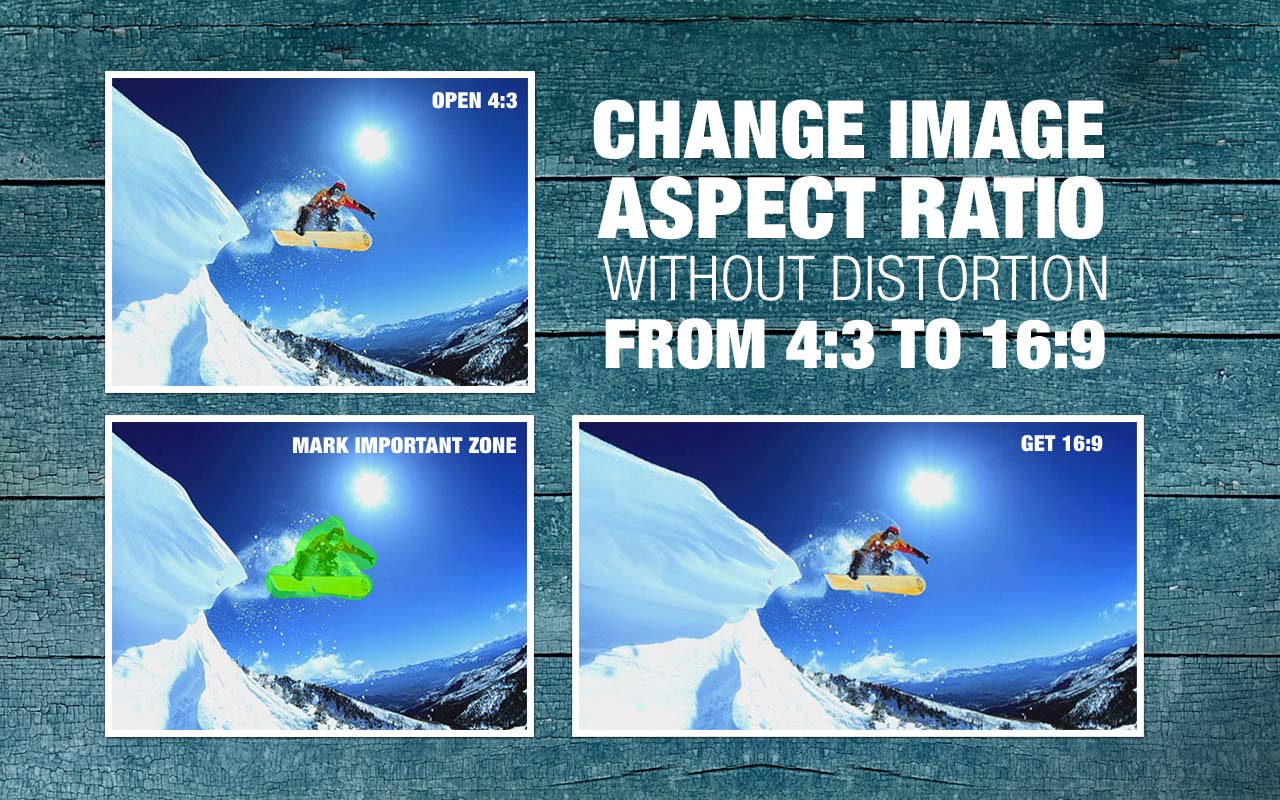

You can also use it to fold an image and reduce the space between objects (or remove distracting details), while retaining a natural appearance.


iResizer is available for both Mac and Windows, for $19.99 and a free 30-day trial version is also available.
This article was last modified on December 9, 2013
This article was first published on December 9, 2013
Commenting is easier and faster when you're logged in!

Recommended for you
How to Adjust Colors Using Photoshop’s Contextual Task Bar
Learn how to use the Photoshop Adjust Colors feature to make quick, non-destruct...

How to Adjust Colors in Photoshop Using Hue and Saturation
Learn how to manipulate an image’s colors using Photoshop’s Hue and Saturation s...

Use Bridge to Find and View All Linked Assets in an InDesign File
Quickly find and collect every linked asset in your InDesign project using this...