



Tagged text is to typesetting as HTML is to a Web page. That is, it’s a bunch of codes around text that gets interpreted/converted into something pretty, something WYWIWYG. I used to love tagged text, back in the old Quark XPress Tags days. I came up with all kinds of cool solutions for managing and massaging test with tags. Even before that, people were doing cool stuff with PageMaker’s tagged text system (PMtags).
For example, one common use for tagged text was to allow someone with very little computing power (say, someone on an old 286 computer) to type fully-formated text with codes. They could type the name of a style at the beginning of each paragraph (such as “@head1:”) and that style would be applied when the txt file was imported into the page-layout program.
Even better, you could easily get a database or spreadsheet to spit out normal ASCII text with the proper codes in it so that it would be formatted when it was placed in QX. It was awesome!
But then came InDesign. InDesign has a tagged text system called (incredibly!) InDesign Tagged Text. It even works. Mostly. However, while I can’t point to any specific problems, I always the sense that it’s somewhat buggy and just barely held together with duct tape. I certainly don’t get the sense that anyone at Adobe thinks of it often or fondly.
And yet, it still has its fans, and they still email us asking what on earth to do, now that they’re using InDesign.
The best piece of advice I can offer is, if you can afford it, get xTags from Em Software. This venerable software was originally written for XPress, but now they have an InDesign version, too. It basically lets you import XPress Tags into InDesign (in case you still have old XPress Tags files, or systems based on them). But it supports many more tags than just those from XPress (it has it’s own tagging codes beyond those from QX).
If you don’t want to standardize on xTags, then you can probably figure out InDesign’s Tagged Text system reasonably well by reading their PDF documentation. I’m honestly not sure if they ship those docs on the install discs anymore, but you can find them here.
With that information, I can see that I can type this in a text file:

One great way to figure out tagged text codes is to export some example text from InDesign. Just select some text, choose File > Export, then choose InDesign Tagged Text from the Export dialog box. InDesign will offer you a few options, but you’ll likely just want to use Verbose (a.k.a. “mostly human readable”):
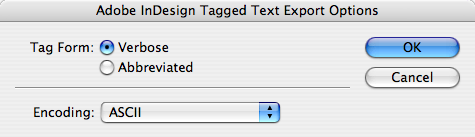
Here’s a couple other helpful hints, culled from Real World InDesign CS3:
- While you do not need to include the DefineParagraphStyle tags in the heading of the file, it’s a good idea to do so. If you don’t, and then import the tagged text file into a document that does not contain the styles referred to in the tagged text file, InDesign will not associate the paragraphs with the style.
- While PageMaker and QuarkXPress paragraph style tags don’t require that you tag each paragraph, you should tag each paragraph in the InDesign version of the file.
- InDesign’s tagged text import filter is fragile, and can crash the program when it encounters a tag it doesn’t understand. Always save your work before importing a tagged text file.
Clearly, tagged text isn’t for everyone, but it can be incredibly helpful in the right situation, especially when trying to automate formatting.
This article was last modified on August 27, 2023
This article was first published on June 9, 2008
Commenting is easier and faster when you're logged in!

Recommended for you
How to Add and Edit Text in Photoshop
Learn the different ways to add text to your Photoshop document and how to edit...

Creating Multiple Indexes in InDesign
When you need to make more than one index in a single document, you need to reso...

Book Explores Emotional Connection with Type
In my quest this year to learn and care more about all aspects of typography, I...