


InDesign How-To: Take Control of Text Wrap


This article is excerpted from the October/November 2007 issue of InDesign Magazine, #20.

Buy this issue or subscribe to InDesign Magazine.
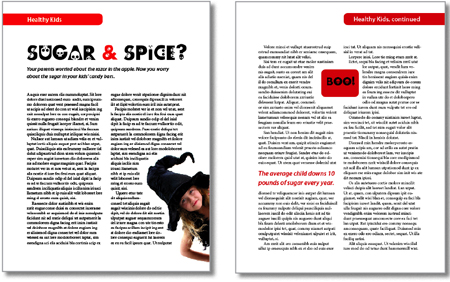
I used four different text wrap techniques to create the two pages above. Do you know them all? If not, click on the following link: Text Wrap PDF. You can view the PDF onscreen and download it to your machine for later viewing and printing.
For even more on text wrap in InDesign, see “Recipes for Applying — and Ignoring — Text Wrap.”
We highly recommend Adobe Reader to view this PDF. Download the latest Acrobat Reader here. To learn how to configure your browser for viewing PDF files, see the Adobe Reader tech support page.
This article was last modified on January 5, 2023
This article was first published on December 10, 2007
Commenting is easier and faster when you're logged in!

Recommended for you

How to Adjust Colors in Photoshop Using Hue and Saturation
Learn how to manipulate an image’s colors using Photoshop’s Hue and Saturation s...

Using Photoshop’s Generative Fill to Remove Objects
Learn how to simply remove items from an image in Photoshop, without extra conte...
How to Adjust Colors Using Photoshop’s Contextual Task Bar
Learn how to use the Photoshop Adjust Colors feature to make quick, non-destruct...