



Peter wrote:
I have an InDesign book and it contains about 25 .indd files.
One of those files is our style master with about 30 or so Para styles and some
15 Character styles. We wanted to rename (actually just want to remove the spaces eg Para Style 1 T ParaStyle1) those styles so that it flows through the rest of the book.Unfortunately it appears that by renaming the Master file, it will simply append
the “new” styles to the rest of the files instead of replacing the old ones. We
would then need to open each file in turn and individually delete and replace
each style.Is there a quicker way?
That is a great question Peter. Unfortunately, InDesign treats a renamed style as a new style when you are syncing books.
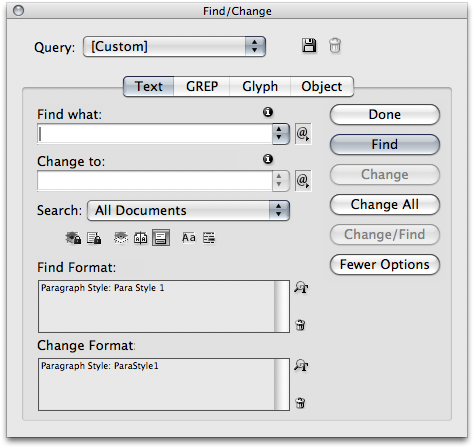
Using find/change would be much faster for you. If you open all 25 documents and run a find change (edit > find/change), you can change the styles from Para Style 1 to ParaStyle1. Make sure that you choose “All Documents” and it will affect all open documents. While it is not as slick as the sync method, this should get the work done.
This article was last modified on July 11, 2023
This article was first published on August 12, 2009
Commenting is easier and faster when you're logged in!

Recommended for you

Adding Strokes to Just the Corners of a Frame
Ellis H. wrote: What we need is a way to place a stroke on only the corner(s) of...

How to Span and Split Text Across Columns in InDesign
Learn how to make text in InDesign to span across multiple columns in a multi-co...
Importing iWork or Excel or Anything Else Into InDesign
Karen writes: The charts generated by iWork Numbers are beautiful and I would li...