




Ellis H. wrote:
What we need is a way to place a stroke on only the corner(s) of the graphic box.
 When I read this, I immediately thought of our good friend Rufus Deuchler in Italy, who came up with the solution to corner-strokes a couple of years ago before he was nabbed by Adobe to be an evangelist. I was dumbfounded when he showed me this because it’s incredibly simple and yet achieves something that I didn’t realize was possible in InDesign.
To make a corner-only stroke, choose Stroke Styles from the Strokes panel flyout menu, click New, and set the Type pop-up menu to Dash. Set the Pattern Length to something larger than your largest frame would be, up to about 830p (350 cm). Set the Length of the dash to be the size you want the corner to be, such as 1p6.

Now — and this is the important part — set the Corners pop-up menu to Adjust Gaps. That tells InDesign to adjust the gaps to fill the space that the stroke doesn’t fill. In other words, just put the strokes on the corners.
Now you can press OK to save your stroke and apply it to your frame. Of course, the frame can’t be too huge or have too large a stroke, but in most cases this works great. Here’s the stroke applied to a couple of frames, at two different sizes and stroke thicknesses:
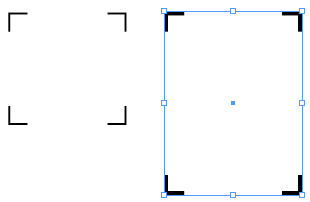
Truth be told, Ellis wrote back to tell me he figured this one out himself even before I got a chance to post this. But it was a good chance to share a fun tip! Thanks, Ellis!
This article was last modified on December 18, 2021
This article was first published on March 24, 2008
Commenting is easier and faster when you're logged in!

Recommended for you
Illustrator’s Two Kinds of Type
Khara Plicanic explains the two kinds of type in Illustrator.


Quick Wins: Adjusting Color in Photoshop
Use these five resources to get better at adjusting color in Photoshop