




Want to save time and aggravation in PowerPoint? Instead of having to change your theme every time you want to use a custom one you have stored, set it as default! Here’s how.
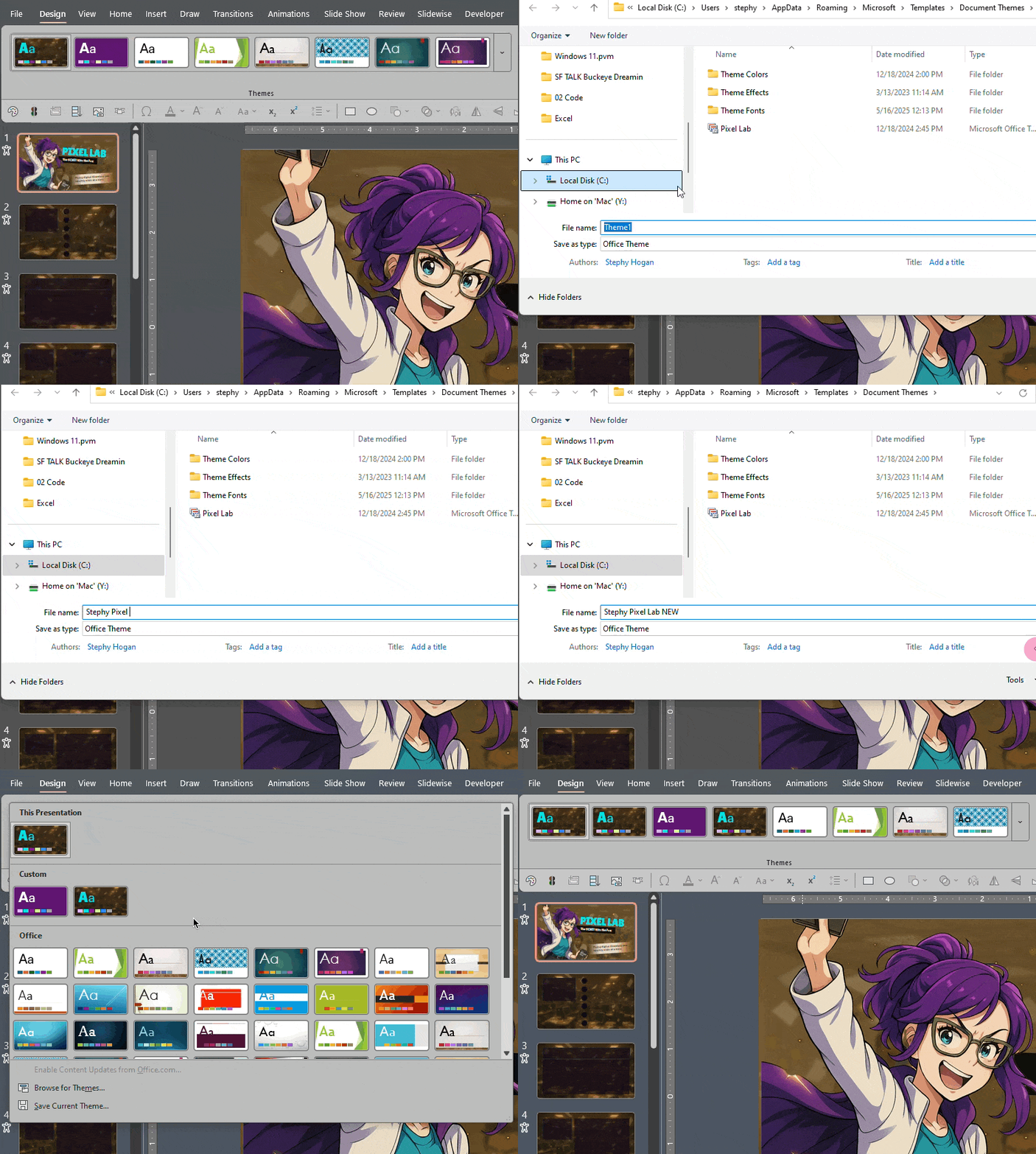
First, save your custom theme by going to the Design Tab > Themes dropdown and right-click on the theme in your current presentation.
Choose Save Current Theme at the bottom.
Then go back to that same dropdown, right-click on your custom theme and choose Set As Default Theme.
This article was last modified on October 30, 2025
This article was first published on March 7, 2025
Commenting is easier and faster when you're logged in!

Recommended for you

Hiding Page Numbers in PowerPoint’s Slideshow Mode
With a simple animation trick you can de-clutter your slides and present a more...

How to Stretch an Image Without Distortion in PowerPoint
Learn how to stretch an image to fill out a slide, right within your PowerPoint...
How to Keep AI-Generated Presentations Fully Editable
An AI-assisted workflow that actually works, so your files are beautiful and fun...