




I can’t yet tell if this is completely frivolous or mind-bendingly brilliant.
Everyone knows that Adobe has been building many of their InDesign panels in Flash in CS4 and CS5, and that they are encouraging developers to use Flash as their basic method for creating user interfaces (UI). But I didn’t quite realize that this implies that any SWF you create can become its own InDesign panel.
For example, I grabbed a page from a recent issue of InDesign Magazine (this was from the InDesigners section, in which Pam Pfiffner was discussing a lovely layout produced with InDesign). The page contained a mso (multi-state object, made with the Object States panel) and some buttons to jump from one state to the next. I exported that one page as a SWF (File > Export), named it nettles.swf, and saved it in Applications > Plug-ins > Panels. (Don’t have a folder called “Panels”? No problem; I just made that “Panels” folder myself!)
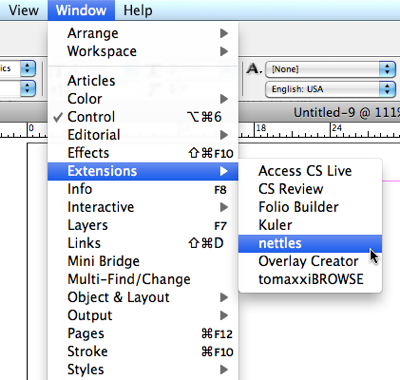
When I re-launched InDesign, the program saw the swf, assumed it was a new plug-in, and placed it in the Window > Extensions submenu:
Choosing my new swf (nettles) from the Extensions submenu opens the prettiest panel I ever did see:
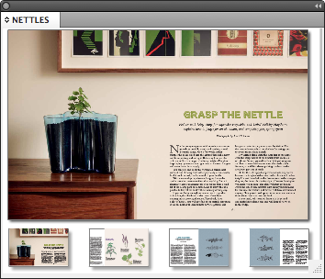
The content in the panel resizes along with the panel, of course. And, best of all, the buttons and MSO in the SWF work perfectly! It’s a completely interactive experience.
Is this a brand new feature? No, it works in both CS5 and CS4, on both Mac and Windows!
Okay, folks, if you could create any InDesign panel you wanted, what would you put in it?
This article was last modified on December 21, 2021
This article was first published on July 25, 2011
Commenting is easier and faster when you're logged in!

Recommended for you

Style Highlighting
A new free script can reveal at a glance where any style has been applied in you...

InDesign Magazine Covers Your Version, Too
I’ve been the Editor in Chief of InDesign Magazine for 26 issues (that...

Create a Pocket Folder Template in CS5
Keith shows a clever way to create a pocket folder template with the new Page to...