




Erin wrote:
When I try to export, InDesign advised me that there is overset text on a few pages — and I go to the pages and can not locate any overset text. How can I find it?
Excellent question, Erin! The trick is the Preflight panel. Whenever there is overset text, you will probably see a red circle in the lower-left corner of the document window, along with the number of errors your document has:

I say “probably” because there’s a tiny possibility that you have turned off Preflight, or that you’re using a preflight profile that doesn’t check for overset text, but for 99% of users, preflight is active and checking for overset. Anyway…
You can double-click that red circle to display the Preflight panel (or you can find the panel in the Window menu, of course). The Preflight panel will show that you have a “text” error. Hold down the Option/Alt key and click the “expand” triangle, and you’ll see all the text problems, including the oversets.
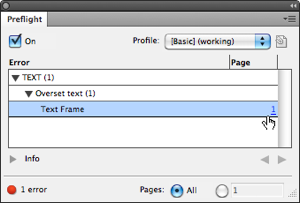
And here’s the good part: In the right column is a page number, and if you click that page number, it’ll take you right to the offending story!
This article was last modified on January 25, 2024
This article was first published on October 28, 2011
Commenting is easier and faster when you're logged in!

Recommended for you

Moving your Find-Change Queries to InDesign CC
How to move find/change queries to InDesign CC.
How to Share a Custom Dictionary
Dave wrote us the following: I was wondering if its possible to have the whole c...

Preflighting in InDesign and Adobe Acrobat
Creating documents that print smoothly and that look as good in print as they do...