



Every now and again, I’ll spot a post on the User to User Forum from someone who’s misplaced the cases that his/her software came in and now want to install on a new machine or just got a laptop for travel and wants to take advantage of the two allowed concurrent activations.
As long as the software is available, installing is easy, but activating it without a serial number isn’t going to happen.
Before I get into a little trick to find the serial number on a machine that’s already running allow me to step up on soapbox and point out that the best way to avoid problems is to register your software online IMMEDIATELY after installing. You’ll need a free account with Adobe but this will assure you of access at any time to your records.
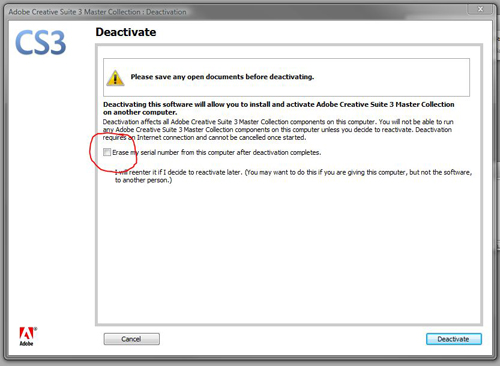
If you didn’t do that, here’s a little trick originally posted by forum contributor Peter Spier to use when you’re in a pinch. Just deactivate the software. You’ll find the deactivate command under the help menu. (note: it may take a minute or two to become available) When you begin the deactivation process you’ll get a window that will contain a check box to remove your serial number. DON’T CHECK IT.
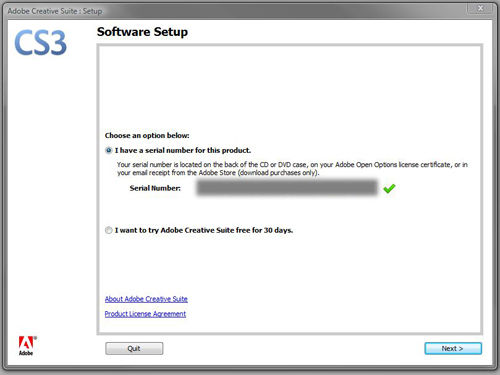
Once you deactivate, the application will automatically close. Upon relaunching, you’ll be greeted with the activation wizard with your full serial number already filled in.
And to repeat my earlier advice, once you have this taken care of please register your software with Adobe. You’ve invested a lot of money in it and registering the product is the best way to protect that investment.
One final note, this will use up one of your twenty activation/deactivation choices which I wrote about here.
This article was last modified on December 19, 2021
This article was first published on July 30, 2008
Commenting is easier and faster when you're logged in!

Recommended for you

Copying/Pasting Text from PDFs to InDesign
The other day I needed to copy a paragraph of text from a client-supplied PDF in...
InDesign CS3 Starts Shipping Today (and Those Other Design/Web CS3 Apps Too)
So ? who cares if it's April 16 and you spent your last dollar paying your incom...
Beware the Placed InDesign Stitching Bug
Soon after InDesign CS3 was announced, I posted about the wonderful new ability...