


Graphics How-To: John Trevino’s Layers of Meaning



Artists are inspired by events in their personal lives, but how those situations or emotions are express is what separates the good artists from the great ones. John Trevino used the dislocation he felt after moving to Los Angeles as the source for his digital painting “Street Scene.” Without a home of his own or a means of expressing himself through art, Trevino felt not unlike a denizen of the streets who nevertheless wants to believe that life will get better for him.
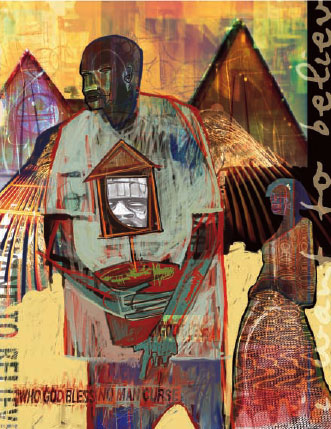
In this excerpt from “The Secrets of Award-Winning Digital Artists,” you’ll see how Trevino created Street Scene using Photoshop layers and Painter effects. Along the way you’ll get a glimpse into his philosophy and technique, and pick up a few ideas for your own creative work.
We’ve posted this excerpt as a PDF file. All you do is click the link “Street Scene” to open the PDF file in your Web browser. You can also download the PDF to your machine for later viewing.
To open the PDF, you’ll need a full version of Adobe Acrobat (5 or higher) or the Adobe Reader, which you can download here:
 .
.
To learn how to configure your browser for viewing PDF files, see the Adobe Reader tech support page.
Excerpted from “The Secrets of Award-Winning Digital Artists” by Jeremy Sutton and Daryl Wise. Copyright © 2002 Wiley Publishing. All rights reserved. Reproduced here by permission of the publisher.
This article was last modified on March 15, 2022
This article was first published on April 14, 2004
Commenting is easier and faster when you're logged in!

Recommended for you

From Paper to PDF: Vectorizing Hand-Drawn Artwork with Photoshop and Illustrator
I have a close friend, Mike Manoogian, who is a brilliant lettering and logo des...

Editing Highlights and Shadows in Adobe Lightroom and Camera Raw
Adobe Photoshop Lightroom and Adobe Camera Raw have two sets of controls for mak...

Advanced Layer Blending in Photoshop
Photoshop’s Layer Modes provide several ways of enabling you to see throug...