




Microsoft Word may not get much respect from many InDesign users but it’s an integral part of almost everyone’s workflow. While many folks shudder just thinking about receiving a Word file, amongst all of that manual formatting that the client was asked not to do, there is some positive news about the newest (though not new) DOCX file format which was introduced in Word 2007.
That good news comes not from the text but from the graphics that might have been placed there by the client. The older DOC format would take whatever graphics had been inserted and convert them to RGB PNG files, but DOCX does a much better job of preserving inserted graphics. I placed several TIF files into a Word 2007 document and was very pleasantly surprised when placing the DOCX file into an InDesign document.
The original graphics showed up in the links panel as embedded graphics. By unembedding the graphics, I was able to open them in Photoshop to them. I was pleased to see that the only thing that had changed from the original graphics were file names. As far as I could tell they were identical even retaining layers and color profiles.
The above is all well and good if you’re placing the document, but what if you only need the graphics? Here’s a bit more good news for you.
The DOCX format is really just a glorified ZIP file. Change the file extension to ZIP and extract the contents and you’ll have instant access to the graphics.
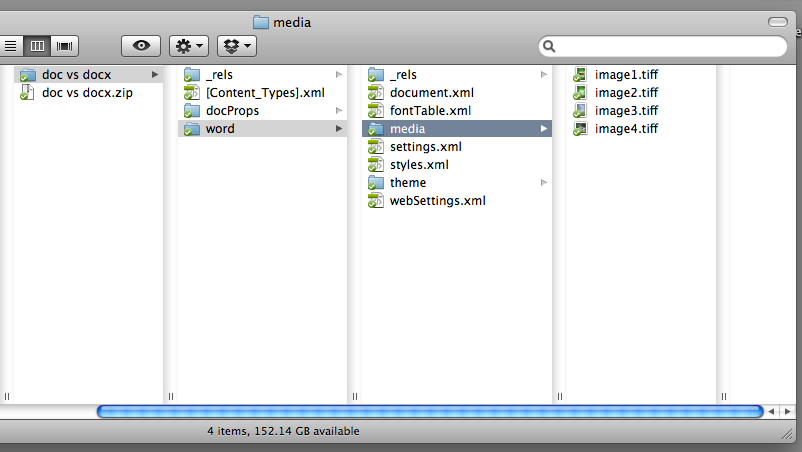
The news isn’t quite as good for EPS files. While they appear to be okay, a closer examination revealed that they had been converted to Enhanced Metafiles. Not a huge problem if you’re printing something like a DocuTech but something to be careful of when sending to a commercial printer or attempting to reuse the file elsewhere.
This article was last modified on December 20, 2021
This article was first published on September 17, 2010
Commenting is easier and faster when you're logged in!

Recommended for you
How to Balance Text Columns Automatically and with Baseline Grid
Bring balance to your InDesign spreads with this Text Frame Option.


Interview with Joy Pollard, Designer and Adobe Certified Professional
Learn how roller derby, astronomy, and theater influenced one designer’s journey...