




There’s an old saying that a craftsman is only as good as his tools, and it applies to artists and designers too. Of course, nowadays many of our tools are digital, so you have the ability to customize your tools exactly to your liking. And in a new course by Lynda.com course by John Derry, Customizing Brushes in Photoshop, you can learn how to create the perfect tools for crafting digital artwork.
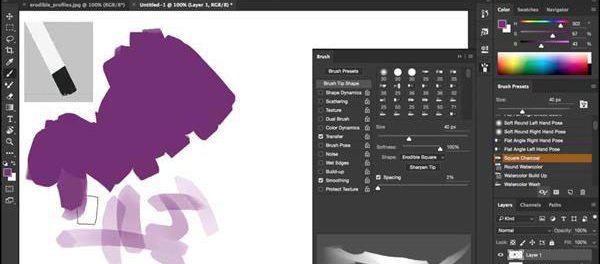
Here’s the official description:
Photoshop ships with lots of great brushes, but it’s way more fun and interesting to create and customize your own. In this course, John Derry shows you how to get a whole new range of artistic options for your work with Photoshop’s brush-making features.
John begins by going over some important brush tips that many artists are unaware of: bristle, erodible, and airbrush tips. He talks about how to customize the brushes and use them to mimic natural bristle brushes, chalk, and spray paint. He also addresses some global issues such as paint flow and spacing, which can have a dramatic impact on any brush you create.
From there he jumps into some more advanced techniques, such as blending colors, loading brushes with multiple colors, and using Brush Projection. Use these tips together to extend the toolset and maximize your creative freedom in Photoshop.
Topics include:
- What brush do you want to create?
- Designing brush tips
- Painting with bristle tips and erodible tips
- Simulating spray paint with airbrush tips
- Saving brush presets
- Blending color
- Enhancing fidelity with dual brushes
In the free movie below, John shows how to take an organized approach to figuring out exactly what kind of brush you need for a specific job. Check it out!
Customizing Brushes in Photoshop
What brush do you want to create?
For Lynda.com members, if you are currently signed in to your account, you can also check out these videos from the series.
Not a Lynda.com member?
Get 10 days of free unlimited access to Lynda.com.
The illusion of continuous strokes
Designing a captured brush tip
Replicating chalk with erodible tips
This article was last modified on November 18, 2016
This article was first published on November 18, 2016
Commenting is easier and faster when you're logged in!

Recommended for you
The Designer’s Guide to AI and Copyright
AI is the new normal, but do you know the laws to keep you and your work protect...

Seeing Patterns
An object lesson in how to analyze patterns and recreate them in your favorite a...