




Macworld Expo was held last week in San Francisco and, although the show seemed to be mostly about iPod accessories and cases, there were a few new items of interest to both Mac- and Windows-based digital photographers.
Although iPhoto — Apple’s entry-level photo cataloger and editor – is hardly a high-end product, it does sometimes have its uses for quick-and-dirty presentations, backups, or for taking advantage of Apple’s photo printing service. Apple’s new iLife 2005 (which ships in late January) brings another version of iPhoto, which includes a number of new features.
The new iPhoto facilitates better organization and searching thanks to the addition of hierarchical folders and a much-improved find feature. However, since the program maintains an internal database of your images, there’s still no way of cataloging off-line volumes and archives.
Perhaps the most surprising new feature is iPhoto’s support for Raw format. Although iPhoto does not support Adobe’s new DNG spec, its Raw format compatibility list is impressive. It seems a little odd to add Raw support to an entry — level image cataloger — do novice users really shoot raw? And do they really need the extra editing flexibility?
Although I didn’t get a chance to play with the program first-hand, from watching the demos it looks like the new iPhoto’s Raw support might prove handy to more serious Raw shooters. It appears that iPhoto imports Raw files using a stock set of default parameters, meaning that importing Raw is no different than importing JPEG. Tell iPhoto to import from your camera or media card and it will automatically add your images to the library, and create thumbnails, without you having to specify any Raw conversion parameters. For quickly producing prints, slide shows, or to simply view Raw images, iPhoto might prove to be a faster more convenient tool than Adobe Photoshop CS or your camera’s bundled Raw software.
A new floating Adjust palette provides a simple slider interface to all of your editing controls, as well as a three-channel histogram and Levels control (see Figure 1). With the Adjust palette you can quickly tweak your Raw settings, but it was impossible to tell if Apple’s Raw processing allows for the same type of highlight recovery that Adobe’s tools provide.
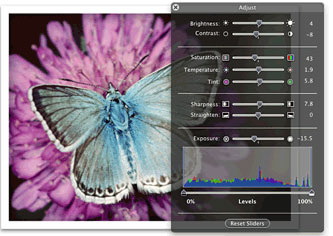 Figure 1: The floating Adjust palette in iPhoto 2005 makes it easy to work with Raw files.
iPhoto is still no substitute for a higher-end cataloging app, and is a far cry from Photoshop, but it just might find a place within your Raw workflow.
Apple has supported on-line Photo printing for a few years now, and with version 5 of iPhoto, they’ve lowered the cost of a 4-x-6-inch print to just 19 cents. Although I don’t regularly use the iPhoto printing service, I have always been impressed by both print quality and turnaround times. Here in the San Francisco Bay Area, prints are usually delivered the day after ordering. The new price definitely undercuts home printing and should make the service far more attractive.
In addition to on-line photo prints, Apple has also offered a book-printing service for several years. Version 5 introduces several new book options including soft-cover letter-size books, soft-cover 8-x-6-inch books, and really cool tiny 3.5-x-2.6-inch soft-cover books. In addition, books now support duplex printing. Because Apple’s $30 price point for the hardcover book hasn’t changed, you now get double the pages for the same price. iPhoto 5 also includes several new photo book layouts.
In concept, these photo books are a fantastic idea and the new sizes and designs are top-notch. However, print quality remains marginal at best — not even as good as what you’d expect to see in a low-quality color magazine. Posterization, weird streaky artifacts, low detail — all of the problems that plagued the previous books are still there with the new formats. Hopefully, future updates will improve image quality in addition to introducing new formats.
Overall, iPhoto 5 will be worth the attention of any Mac-based digital photographer.
Solio Solar-Powered Charger
Taking a Macworld Best of Show award, Better Energy Systems Ltd. showed its Solio portable charger. Like most other products at Macworld, the Solio was being billed as an iPod accessory, but it will also work as a portable, solar-powered camera battery charger.
Sporting an excellent foldable design, the $119 Solio weighs only 165 grams, making it ideal for backcountry photographers. Although the Solio ships with a cable for charging an iPod, optional accessory packs provide cables for charging cameras, cell phones, and PDAs (see Figure 2). I’ll be posting a more thorough review of the Solio in the coming weeks.
 Figure 2: Better Energy Systems claims its Solio solar charger can charge a mobile phone in 4-5 hours of direct sunlight.
Epson P-2000 Photo Viewer
Alhough Epson’s new portable hard-disk-based photo viewer has been out for a few months, they’ve been somewhat hard to find. Macworld was my first chance to get a look at Epson’s $499 unit, which far outshines other “digital wallet” type portable image viewers.
Built around a large 3.8-inch LCD screen, the P-2000 delivers exceptional image quality, and packs a 40GB hard drive. A USB 2 connection and media slots provide connectivity with your camera or media cards, while its video-out ports make it a good portable presentation device.
The P-2000 includes support for all popular image formats, including robust Raw support. It can also play MPEG 4 and motion JPEG video files, and MP3 and AAC audio files.
What separates the P-2000 from its competition is the quality of its screen as well as its overall build quality and excellent interface (see Figure 3).
 Figure 3: Epson’s P-2000 is an excellent battery-powered portable media vault and viewer.
However, while the P-2000 provides some cool presentation features such as the ability to create slideshows with internally generated dissolves, it lacks the ability to play PowerPoint presentations, unlike the SmartDisk FlashTrax.
Supacam DV6 Video Camera
Only slightly larger than an iPod, Nisis USA’s SupaCam DV6 is a portable SD-card based camera the shoots 6-megapixel stills and full-frame 30 fps video. Granted, the 6-megapixel stills are interpolated up from 3 megapixels, and the full-frame video is MPEG-4 compressed, but at $269, it’s hard to beat simply from a “wow, this is really cool” standpoint. Oh, and it’s an MP3 player (see Figure 4).
 Figure 4: The SupaCam DV6 is a tiny, low-priced still and video camera that shoots MPEG-4 video directly to an SD card.
From looking at the image samples, the camera’s still quality is definitely superior to the still quality found on most DV cameras, but it’s hardly the quality you’d expect from a 6-megapixel dedicated still camera. Obviously, at $269 some corners had to be cut and it looks like the biggest corner was lens quality. If you’re looking for a tiny portable still camera with good video capabilities, the Sony DSC-T1 and some of Canon’s newer Elphs provide similar capabilities, with better still quality. But they’re much more expensive, lack the video-camera-like form factor of the DV6, and don’t have MP3 players. (Of course, given that every gadget now seems to play MP3 files, you’re probably already carrying two or three.)
New Digital Cameras
Although no one was releasing any new digital cameras at the show, Olympus, Nikon, and Canon all had a strong presence at Macworld, providing a chance to see some of their more recent models.
Olympus made a big push with the new Evolt E-300, a compact 8-megapixel SLR with interchangeable lenses. Offering a smattering of interchangeable lenses, the E-300 finally gets Olympus a higher-end SLR that’s more in line with the price point of its competition. Although the camera felt good and provides a very compact design, we didn’t get a chance to look at any pictures up close.
Obviously, Macworld is not a photo show (in fact, with the proliferation of iPod accessories, it’s hardly a Mac show), but the new iPhoto might prove to be a surprisingly useful higher-end photo tool.
This article was last modified on December 14, 2022
This article was first published on January 18, 2005
Commenting is easier and faster when you're logged in!

Recommended for you

Creating Duotones in Photoshop
Duotones offer designers a great way to add visual interest to photos. Essential...

How to Turn a Photograph Into a Cartoon in Photoshop
Learn the simple steps for creating a seemingly hand-drawn cartoon from a photo,...

Heavy Metal Madness: Men Live In a Vacuum… Tube
My last column, which addressed the gender gap in housework duties, drew a numbe...