




CPS Labs Ltd announces today the release of FlashSpring 1.2, an easy and fast PowerPoint add-on for authoring high quality Flash content. With FlashSpring in place, anyone can create Flash content in the PowerPoint environment by converting PowerPoint presentations into Flash clips.
All FlashSpring functions are easy to locate and access from the Power Point toolbar. With no special skills, or Flash knowledge, you can produce portable and compact Flash presentations that can be viewed by millions of people, who use different platforms and browsers.
“FlashSpring makes learning content creation and distribution much easier for teachers and students,” says Yury Uskov, technical director at CPS Labs. “Compact Flash presentations created with FlashSpring are extremely effective for email and web marketing. FlashSpring allows creating Flash e-cards, photo albums and other content for entertainment.”
FlashSpring is available in Lite, Pro and Server editions. FlashSpring Lite is distributed free of charge and produces high quality Flash clips, converting all elements of PowerPoint presentations except animation and sound. FlashSpring Pro is the most popular version that has many striking features. For those who need to convert PowerPoint presentations in batch, we offer FlashSpring Server, an effective solution for server-side PowerPoint-to-Flash conversion.
The table below contains features comparison of Pro and Lite versions.
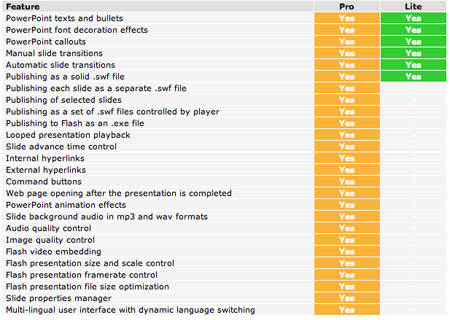
The FlashSpring team is constantly working on product improvement. Every month a new version is released. The latest FlashSpring Pro 1.2 is enhanced by the following features:
- Support for PowerPoint hyperlinks and command buttons in Flash presentations. Now your presentations become more interactive with Power Point relative links support and opening web pages in new windows.
- Support for external Flash clips embedding. This new feature allows you to expand the visual possibilities of Power Point. Now embedded Flash clips are displayed correctly both in PowerPoint presentations and Flash presentations created with FlashSpring.
- Support for specified web page opening after the presentation view was completed.
FlashSpring is available in three editions. FlashSpring Lite is distributed free of charge, FlashSpring Pro costs $149 (USD), and FlashSpring Server costs $2400 (USD). Additional information on FlashSpring, as well as its evaluation version is available at https://www.flashspring.com
This article was last modified on January 3, 2023
This article was first published on January 26, 2006
Commenting is easier and faster when you're logged in!

Recommended for you

How to Extract Images Using Photoshop’s Refine Mask
Splitting Hairs with Refine Mask We can only accomplish so much using manual mas...
Top New Features in Photoshop
A little over a week ago, Adobe rolled out updates for Photoshop, Muse, and the...
Upgrading to Photoshop CC FAQ
Adobe Product Manager Jeff Tranberry has posted an extensive FAQ on his blog abo...