


Flash MX How-To: Testing the Size of your Flash Files


The Download Horse Race
When you’re looking at the Bandwidth Profiler graph, you are looking for places that cannot download quickly enough. You can actually simulate the download process by having the Bandwidth Profiler show how your movie will get shoved down the pipeline via an end-user’s connection speed. You choose the connection speed you wish to test by going into the Debug menu. In the Debug menu you can choose what type of pipeline you wish to analyze. In this case we’ll choose 14.4 KB/S.
When you select a slow connection speed, you’ll notice that all of the bars will get bigger. The only reason they get bigger is because in relationship to the pipeline they are bigger. I always like to think of the pipeline by tilting my head on it’s side, and looking at the red line to the bottom of the graph as the pipeline. Everything that’s above the red line can’t fit through the pipeline unless it’s split apart into its individual pieces. When this happens there will be a small bottleneck, where the heavy frame must download while the person waits for it to play.
Let’s see how this works. Get a file that has some sound or a lot of animation in it open. Make sure you stop and then rewind so that the playback head is over the first frame. Select View > Show Streaming. This will show you a horserace (see figure 5). The green bar across the top, where it shows frame numbers, is telling you how fast your movie is downloading over the pipeline size you chose in the Debug menu. So basically the horserace is between the green download bar and the playback head. You want the green bar — the download — to stay in front of the playback head. If the green bar doesn’t stay ahead of the playback head, it’s telling you that your file needs to pause instead of streaming perfectly. You can really play around with this, and discover a good deal of information regarding your user’s experience of download with your movie.
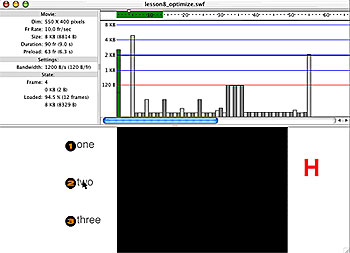
Figure 5: Show Streaming lets you compare download speed t playback speed.
However, a word to the wise: if you have a very fast processor on your machine, the profiler’s horse race may not be exactly correct. So, sometimes it pays to have a slow machine so you can test your movie more accurately. I always test for the lowest common denominator. I often set the Debug speed to a 14.4kb/s connection just to see what will happen to my file during a slow server day. And as we all know that can happen at almost any moment in our interesting Web-connected world.
Dealing with Bottlenecks
If you do find bottlenecks you have some decisions to make. You can either preload some of those frames by setting up a small preloader at the beginning of your file, or you can try and reduce the load or spread the load out across several frames. One of the old methods we used to use in Flash 2 and 3 is to go ahead and put all of our symbols into the first frame hidden behind a background. And I actually think this is a pretty interesting way to get things preloaded if you don’t want to do any programming. So you can hide symbols in places and spread out their load because once a symbol is loaded, it’s ready to be used by the file.
In terms of preloaders, there are resources out there that can supply you with a preloader. But just be aware that preloaders, even with snazzy little animations for your user to watch while you download some of your file, can be really annoying to people. If you really want to be a sophisticated Flash designer then you want to do your best to create a file that streams nicely without having to do all of this preloading stuff. I honestly feel that preloaders are the cheap way out a great majority of the time. If you create intelligently and keep the file size down by testing with the size report and the bandwidth profiler, then you usually won’t have this issue of trying to figure out whether or not you need a preloader.
Hopefully I’ve helped you discover some of the more interesting features of Flash that, although they’ve been around for a while, will help you become an extremely sought-after Flash-production person.
Like this lesson? There’s more where it came from at Digital Media Training.
This article was last modified on January 8, 2023
This article was first published on July 16, 2002
Commenting is easier and faster when you're logged in!

Recommended for you

Converting Shapes
Did you ever need to change the shape of an existing object in your layout?...

InDesign How-To: Create Anchored Form Fields
See how to anchor fillable form fields so they flow with text and how to quickly...

Decimal Align Numbered Lists
Abbe wrote: I like to use InDesign's auto-numbering feature, but don't see a way...