



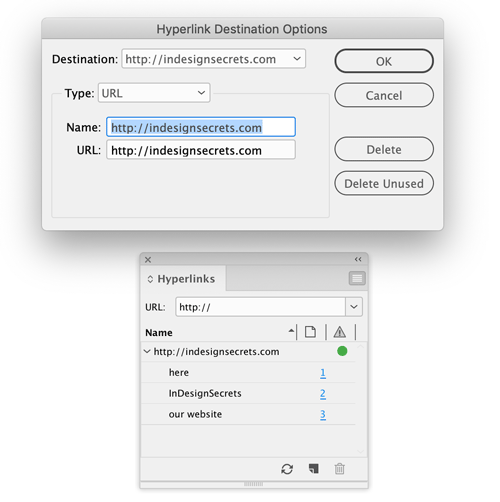
Need to edit several hyperlinks that all point to the same destination? You don’t have to fix them one by one. Just go to the Hyperlinks panel menu and choose Hyperlink Destination Options. In the dialog box, choose the destination you want to edit and update its name and/or URL. When you click OK all the hyperlinks that point to that destination will be updated.
This article was last modified on January 12, 2026
This article was first published on May 6, 2019
Commenting is easier and faster when you're logged in!

Recommended for you

InDesign How-to Video: Create a Duotone Effect
In this week’s InDesignSecrets video, Mike Rankin shows off a great technique to...

How to Mess Up Your Hyperlinks Panel
Don't try this at home! (But if you do accidentally, here's how to fix it.)
InQuestion: Removing Unwanted Text Anchors
Jamie McKee identifies a strange hidden character, tells where it came from, and...