



After a couple of earlier posts on this topic earlier this year, I’m back again with some tips on finding the best PDF reader for your tablet. What triggered this post was updates from two of my favorite PDF readers in two days.
Why am I back on this subject again? In February, I wrote “For Interactive PDF, Not All Readers Are Equal.” In that post, I found that many PDF readers on both computers and tablets didn’t support interactive PDF features well. I trashed Adobe Reader 10.1 for mobile devices as one of the worst of the PDF readers for mobile devices. In April, I updated my report for Acrobat Reader 10.2 when a “A Much Improved Adobe Reader for Tablets Appears.”
But, as many of us spend more of our time using tablets (and I suspect InDesign users are high users), software developers are racing to add new features and better support. However, some apps are better than others, either because the developer has the resources to improve their app rapidly, or because they are a nimble developer with a proven track record. I can’t hope to review all of the PDF readers out there (there are dozens on iOS alone), but I can point you to a couple that are moving in the right direction.
Free Readers: Mobile Adobe Reader 10.3
After a very slow start, Adobe Acrobat developers have now gotten the mobile religion! Adobe Reader 10.3 for mobile devices arrived on Wednesday, July 18. It’s free and is available for both iOS and Android devices but I’m focusing on the iOS version for iPad, iPod Touch, and iPhone. Adobe now seems to be on an aggressive quarterly update schedule. See my previous posts for other features. New features include:
- Add Text Tool to add text to your PDFs
- Improved Forms Interactivity now supporting form features such as field validation, calculation, and formatting
- File Organization to create folders of your PDF files within the application, as well as copy, move, rename and delete PDF files
- Dictionary Support (iOS only). Select some text, choose the “Define” option from the context menu, and you’ll see the definition.

Adobe Reader 10.3 Organizer
What I like best about the mobile Adobe Reader 10.3 is that it has a clean and intuitive interface and is highly compatible with its desktop/laptop Adobe Reader. It’s another sign of Adobe’s depth of support that they also published a new Enterprise Guide to Reader Mobile.
It’s also popular: As of today, Adobe Reader 10.3 ranks as the top free business app for the iPad. It ranks 4 stars out of 5 on the iTunes store from people who have downloaded it.

Top Free Business App
Paid Readers: PDF Expert 4.1, Readdle, US $9.99, iPad and iPhone
While Readdle isn’t a well-known company, they have been an iOS developer from the beginning. Erica Off of Gigaom.com reports:
As far as iOS developers go, Igor Zhadanov can accurately be described as “old school.” He’s been developing apps for iOS since before the App Store was even announced, back when Steve Jobs tried to convince developers that web apps were the way to go on the original iPhone. But since 2007, Zhadanov, now 27, and his 28-person iOS developer team at Readdle have had a string of App Store hits, all created without outside funding.
Since my last posting in April, Readdle has updated PDF Expert twice, first to 4.0 which added document thumbnails in the file manager, embedded audio and video, and support for embedded attachments and PDF portfolios. Most paid readers support one-way copying of PDFs from a server like Dropbox. Today, July 19, with PDF Expert 4.1, they added automatic syncing of PDFs edited in the app back to Dropbox, SkyDrive or WebDAV servers. They also added audio notes and fast rendering. So they’re definitely putting PDF Expert on the fast track.
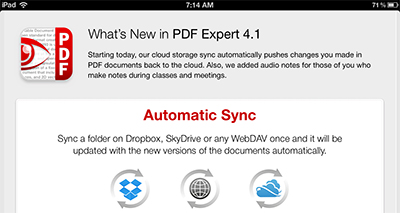
PDF Expert 4.1
Of the apps I have tested on the iPad, I’d definitely rate PDF Expert the best. It has added a lot of features, but it keeps a clean and intuitive interface which makes it easy to use. (I’d rate GoodReader number two, but it has a complex interface that only a developer could love.) PDF Expert has a large number of devoted followers who rave about it. It is rated 4-1/2 stars out of 5 on the iTunes App Store.
PDF Publishing on Tablets Is Still Immature
Just remember the warnings I gave in my earlier postings this year: Expecting to publish an interactive PDF with buttons, lots of interactivity, or media isn’t yet practical yet. Most users probably still use simple apps like iBooks which have limited to no capability to handle interactivity. Keep any projects you plan to distribute to tablets using PDF very simple. Links usually work, most interactivity will not work.
Also keep in mind that using PDF readers on tablet devices will also not properly preview print-related features features like overprinting. Eddy Hagen of the VIGC (Flemish Innovation Center for Graphic Communications) points to PDF viewer tests they did on multiple devices. His conclusion: “Reader can not be trusted for print related work on any tablet.” I just tested both PDF Expert 4.1 and Adobe Reader 10.3, and that’s still true.
This article was last modified on December 21, 2021
This article was first published on July 19, 2012
Commenting is easier and faster when you're logged in!

Recommended for you

Changing Layer Visibility in an Interactive PDF
Here's a tutorial on how to change layer visibility in an interactive PDF file.
Change the UI Language in InDesign CS6 and CC
Changing the language of InDesign’s menus, dialog boxes, and panels has be...

Pattern diversions
How to make some interesting and fun "sunburst" style patterns with a few clicks...