




You probably know that you can create your own keyboard shortcuts in InDesign, but a lot of people don’t realize that you can see all your keyboard shortcuts in one place by choosing Edit > Keyboard Shortcuts and then clicking the Show Set button. InDesign saves a temporary text file to disk and opens it in your default text editing program (such as Notepad or TextEdit):
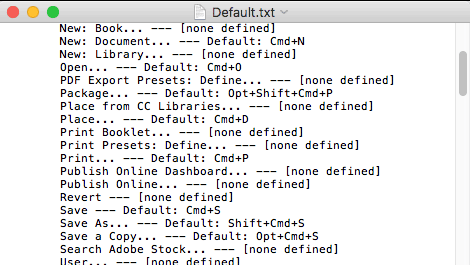
The problem with this list is that there are over 1,700 menu items and features in it, and most of them are set to “[none defined]”. So it’s really hard to find just the features that do have a keyboard shortcut applied to them.
Fortunately, it’s easy to cull out the chaff and get to the good stuff. Just copy all that text and paste it into a text frame in InDesign. Then open Edit > Find/Change and switch to the GREP tab. Now search for:
.+?\[none defined\]\r
And replace it with nothing! (Just leave the Change To field blank, and make sure there is nothing in the Change Format field either.)

Click Change All and… boom, you’re done:
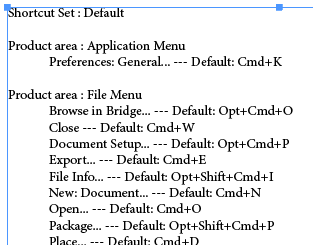
Now enjoy your shortcuts!
(Want to customize and format your list of shortcuts even more? Check out Jean-Claude Tremblay’s article in Issue 77.)
This article was last modified on July 25, 2019
This article was first published on August 2, 2017
Commenting is easier and faster when you're logged in!

Recommended for you

The Peter Kahrel Script Repository Gets a CreativePro Makeover
Peter Kahrel is one of the most prolific and influential InDesign scripters of a...

Remove Blemishes in Photoshop With a Click
Khara Plicanic shows us how to remove blemishes from skin in Photoshop with just...

Interview with Sam Luo, Designer and YouTube Creator
Discover how a passion for helping fellow students led the founder of LYH Studio...